
Year end IT purchases come down to three things before December 31: PCs that can’t run Windows 11, firewall subscriptions near renewal, and servers still on Windows Server 2016. Much of the rest can wait until 2027.
For a business on a calendar tax year, December 31 is a tax date. It isn’t an IT date. Year-end budgets tend to get spent on the accountant’s calendar, while the IT deadlines that matter here come from Microsoft, on January 12, February 1 and October 12 of 2027.
One job here. This piece sorts a year-end shopping list into what has a real date on it and what doesn’t. Planning purchases like these is part of the vCIO strategy and roadmapping inside our managed IT services for businesses in Rockland, Westchester and Bergen counties.

The Dates That Should Drive Year End IT Purchases
Calendar first. Four dates matter to a small business right now, and only some of them involve spending money.
| What changes | Date | What it means for buying |
|---|---|---|
| Windows Server 2016 security updates end | January 12, 2027 | Upgrade, replace, move to Azure, or enroll in paid updates |
| Microsoft-provided SMS and voice sign-in codes retire | February 1, 2027 for most users | Passkeys add no cost; keeping SMS means a paid provider |
| Windows 10 paid updates, year two | Through October 12, 2027 | $122 per device, or $183 to join now, by Microsoft’s pricing rule |
| Secure Boot certificates from 2011 | Expiring since June 2026 | Older PCs may miss boot-level protections |
Notice what’s missing. Nothing on that list says buy something by December 31. The tax calendar says that, and we’ll get to it. Microsoft’s calendar says plan. Early.
Year End IT Purchases That Belong in 2026
PCs That Fail the Windows 11 Check
Windows 10 support ended on October 14, 2025. Staying on it now means paying for Extended Security Updates, and Microsoft’s own description of the program is blunt. The ESU lifecycle FAQ calls it “a last resort paid option” and “a temporary bridge” to a supported platform.
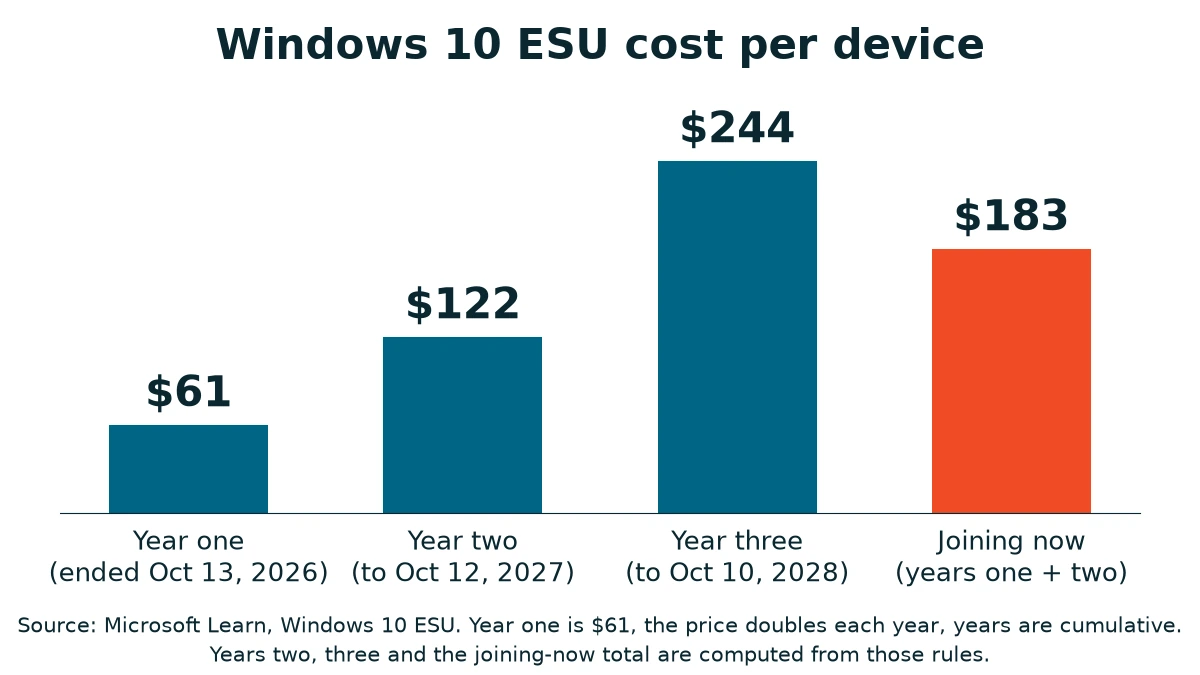
The price is $61 per device for year one, and Microsoft Learn says it doubles every consecutive year, for a maximum of three. Year one ended October 13, 2026. Year two runs through October 12, 2027.
By that doubling rule, year two is $122 a device. The program is also cumulative, which means a PC that never enrolled has to pay for year one as well, so joining now costs $183 per device, and Microsoft says ESU includes no new features and no technical support beyond the ESU itself. Not cheap.
Which PCs are in trouble? Windows 11 asks for a compatible 64-bit processor, 4 GB of memory, 64 GB of storage, TPM version 2.0, and UEFI firmware that is Secure Boot capable, per Microsoft’s requirements page.
A failed check isn’t always a dead PC. Microsoft’s own TPM support article notes that some PCs capable of TPM 2.0 aren’t set up to use it, which is a firmware setting. A processor that isn’t on the compatible list is a different story. Check before you condemn one.
One way to weigh it. ESU buys critical and important security updates and nothing else, and it ends for good when year three runs out on October 10, 2028. For a PC you’re retiring in a few months, a year of ESU can be sensible. For a PC you want to keep for years, it’s a rising bill with a hard stop at the end.
Get a replacement quote and set the two side by side.
One more reason old PCs land on the replace list. Microsoft’s Secure Boot certificates from 2011 began expiring in June 2026, and a PC without the new certificates still starts and runs normally but can’t receive new boot-level protections, according to Microsoft’s Secure Boot guidance.
Some machines need a firmware update from the manufacturer, and that update may only exist while the PC is still in its support period. Don’t switch Secure Boot off to dodge the problem. Microsoft says not to.
Firewall Subscriptions Close to Renewal
A firewall renewal is a purchase. It doesn’t feel like one. Nothing arrives in a box. The subscription is the paid term that keeps threat updates and filtering current, and what happens when it lapses depends on the brand. We walked through that, platform by platform, in what stops working when your firewall’s security subscription lapses.
Term length is where timing matters. I put it plainly.
“It doesn’t really make sense to do a one year subscription because if you buy a three year, you’re basically paying for two years and getting an extra year.”
That’s my experience, so check the math against your own quote. Vendors and resellers set their own terms, and the quieter benefit is the calendar. A three-year term means one renewal decision instead of three, and every decision is a chance to miss the date.
On cost, here is my rough range for the size of business we typically work with.
“If you’re talking about the size of businesses that we typically deal with, I would say between $200 to maybe about $5,000.”
That range is a total, not a monthly figure, and in my experience it usually includes a three-year subscription. Hardware is a separate purchase from your managed agreement, so the number lands on its own line, and it’s worth asking for the hardware price and the subscription price separately so you can see what the three years actually cost.
Network security and maintenance sit inside our managed firewall and network security work. If your subscription expires early in 2027, ask your vendor whether renewing in December changes the price or the term, and ask your accountant whether it changes your tax year.
Servers Still on Windows Server 2016
Windows Server 2016 reaches end of support on January 12, 2027. The server keeps running. What stops is Microsoft’s supply of security updates. We laid out the four paths in Windows Server 2016 ends January 2027: upgrade in place to Windows Server 2025, buy replacement hardware, move to Azure, or pay for Extended Security Updates.
Two details change the math. An in-place upgrade is not free, because Microsoft’s Windows Server upgrade guide says each Windows Server upgrade requires a separate license. And Windows Server 2016 ESU runs through Azure Arc, with billing from January 13, 2027, and it requires Software Assurance, a Server Subscription or SPLA licensing, according to Microsoft’s Azure Arc ESU guide. A server bought with an OEM license may not qualify.
Only one of those paths puts server hardware on your 2026 calendar. If the answer is a new server and you want it counted in 2026, timing matters, because IRS Publication 946 ties the deduction to the year property is placed in service, which it defines as “ready and available for a specific use.” Ask the vendor for a delivery date in writing, then allow time for setup and migration.
Whether equipment that arrives in late December but isn’t set up yet counts is a question for your accountant, not your IT provider. If you’re weighing a new box against the cloud, replace it or move to Azure works through that choice before any order goes in.

Section 179 and Year End IT Purchases: What the IRS Says
We’re an IT company, not tax advisors, so this section repeats only what the IRS publishes. Ask your accountant what applies to your business. According to IRS Publication 946, the maximum Section 179 deduction for tax years beginning in 2026 is $2,560,000, reduced once the cost of section 179 property placed in service during the year passes $4,090,000. The same publication says the 100% special depreciation allowance was reinstated for certain qualified property acquired and placed in service after January 19, 2025.
Two plain facts follow. A deduction lowers taxable income. It doesn’t lower the invoice. And spending a dollar to save a fraction of a dollar only works if you needed the thing, which is why the list above starts with items that have a real deadline instead of items that merely qualify. Buy what you need.
What Can Wait Until 2027
Some things feel urgent in December. They aren’t.
- PCs that pass the Windows 11 check and run well. No purchase deadline attached.
- The February 1 sign-in change. Microsoft is retiring the SMS and voice codes it provides for MFA, and its FAQ says that includes self-service password reset, per Microsoft Learn. Global Administrators and external users follow on July 1, 2027. Microsoft says moving those users to passkeys carries no additional cost, and a passkey can live on a phone, in Windows Hello or on a FIDO2 security key. Keeping SMS means contracting a telephony provider through Microsoft Security Store, which is paid. If some employees have phones that can’t hold a passkey, talk to your IT provider about options. Our guide to which phones can hold a passkey lists Microsoft’s requirements.
- Wi-Fi that works. A refresh is a project for when coverage fails or the office moves, and what business Wi-Fi costs to design and install shows the range.
- Anything bought only because a year-end promotion is about to expire. Do you actually need it?
Waiting is fine when nothing is failing. Otherwise it gets expensive. Here’s how I put it.
“When you skip on something somewhere, you’re going to pay more down the line because you didn’t spend as much in the first place. Whether you have to replace computers more often, or you have to pay someone to fix the exact same problem over and over again because they didn’t put in a real solution.”
“Pennywise and dollar foolish.” That is about temporary fixes and overdue replacements, not about how you pay. One business we support runs on break-fix, buys high-end systems, and opens a ticket when something needs attention, and things mostly work out for it. The trouble starts when the replacement is overdue and the budget isn’t.
How a Hardware Purchase Fits Alongside a Managed Agreement
Hardware is a separate purchase from the managed agreement, and we talk through anything outside the agreement with you before it’s bought. That conversation is part of vCIO strategy and roadmapping, and our piece on what an IT roadmap should cover shows the order I recommend. VJNetworks has supported small businesses across the Tri-State area since 2004, with 97% client retention.
If you want to use November well, bring these to the conversation:
- A list of PCs still on Windows 10, with their ages.
- The renewal date on each firewall subscription.
- Every server and the Windows Server version it runs.
- Your accountant’s cutoff for purchases that count in 2026.
Things People Ask Before the Year Ends
Do we have to buy before December 31 to claim Section 179 for 2026?
Is one more year of Windows 10 updates worth paying for?
How do I find out which PCs can’t run Windows 11?
Our server runs Windows Server 2016. Does it stop working on January 12?
One-year or three-year firewall subscription?
Does Microsoft ending SMS sign-in codes mean buying new phones?
What if we miss December 31?
Talk with our team about what to buy now and what can wait until 2027. No cost, no obligation.