

When a firewall’s security subscription expires, what stops depends on the vendor and the license model. Some firewalls keep passing traffic and only lose threat updates and filtering. Others, once a grace period ends, can stop passing traffic entirely until they’re relicensed.
Ask me what stops working and the first answer I give is the cautious one.
“Depending on which firewall you have, it could be everything stops working. Internet traffic ceases completely. If licensing is expired, typically, there’s a grace period, but if you go beyond that and you hit the wall, it could just completely stop working until you properly license it.”
Notice the hedges. Could be. Typically. They’re there on purpose, because the honest version changes from one box to the next. On some platforms the whole network goes dark after a grace period. On others the firewall keeps routing traffic and simply stops learning about new threats. Neither is good news. Different kinds of bad, different urgency.
If you’re still sorting out the difference between owning a firewall and having one maintained, our page on managed firewall and network security covers that ground in more detail than this piece will. This piece stays narrow. What happens on the day the license runs out, platform by platform, taken from each vendor’s own documentation rather than from memory.
Two Different Things Get Called “the License”
A firewall security subscription is the paid term that keeps a firewall’s protective services current, meaning threat signatures, intrusion prevention rules, and web category lookups, and on some platforms it’s also the right to run the device at all. It’s separate from the hardware, and its expiry date lives in a vendor portal, not on the box.
That last clause is most of the story. Some vendors sell the hardware and the services separately, so the box is yours and the protection is rented. Others license the device itself. With the first kind, an expired subscription leaves you with a working firewall that knows a little less every week. With the second kind, the license is what lets the firewall forward packets in the first place.
So which did you buy? Most owners don’t know offhand. Why would they? Quotes tend to list a model and a term, and that’s usually where the conversation stops.
Cisco Meraki Has Three License Models and Three Outcomes
A Meraki MX security appliance is licensed through the Meraki dashboard, and what a lapse does depends on which of Cisco’s three licensing models your organization sits on. Check which one before you assume anything.
Co-termination. Every device in the organization shares one expiry date. When that date passes, Cisco’s co-termination licensing documentation says the organization enters a 30-day grace period, during which network clients won’t see a difference. After 30 days without valid licensing, all Cisco Meraki devices are shut down until licensing is back in compliance. All of them. The security appliance, the switches, and the access points go together.
Per-device licensing gives each device its own term. The grace period is again 30 days, and afterwards only the devices with licensing problems shut down. The rest carry on. One detail in Cisco’s per-device licensing overview catches people out. If you renew a device that’s already sitting in its grace period, the time it spent in grace comes off the new license. Ten days in grace, then a one-year license, leaves 355 days. Do that math before deciding to wait.
The newer subscription model is the one that breaks the everything-goes-dark version of the story. A subscription that passes its end date also gets a 30-day grace period, but afterwards the networks bound to it move into what Cisco calls a disabled management state. According to Cisco’s subscription compliance page, those organizations continue to function and forward data traffic, which Cisco itself contrasts with the shutdown procedure of its previous model, so on this model a lapse turns into a management problem rather than an outage. Traffic flows. Nobody can see it or change it. What goes is everything around the traffic. No configuration or monitoring through the dashboard, no customer-initiated firmware updates, and no support. Flying blind, basically.
So the hit-the-wall answer I opened with is accurate for two of Meraki’s three models. Not the third. The same licensing covers Meraki access points too, which is why the license term showed up in our breakdown of what business Wi-Fi costs to design and install.
FortiGate Keeps Firewalling, but Watch the Web Filter
Fortinet separates the box from the services, and its FortiOS administration guide says so in one line. “The FortiGate will still function as a firewall if any or all of the FortiGuard licenses are expired.” Firewall policies keep working. The device stays up.
Protection is a different matter. According to Fortinet’s license expiration page, antivirus and intrusion prevention keep scanning, but their databases stop updating and no new signatures are added. Does that matter? A FortiGate that lapsed in the spring is still inspecting traffic in the fall against the spring’s threat list. Spam filtering and outbreak prevention stop outright, because both depend on real-time lookups to FortiGuard.
Then there’s web filtering, which is where a security-only lapse can look exactly like an outage. Category-based web and DNS filtering asks FortiGuard, in real time, what kind of site each request is. With no license those lookups fail, and Fortinet’s documentation says that by default all web and DNS traffic is dropped, unless someone enabled the option to allow requests when a rating error occurs, in which case everything passes through with no filtering at all. Static URL lists you entered yourself keep working either way.
Picture that from the front desk. The firewall is running. Green lights. Every browser says the site can’t be reached. To the office, the internet is down.
Two more details matter at renewal. Fortinet says FortiGuard services are designed to be continuous, and any lapse requires coverage back to the contract expiration date. And since FortiOS 7.4.9 and 7.6.4, a FortiGate with an invalid Firmware and General Updates license schedules a required firmware upgrade to the latest patch of its current minor version. You can postpone it seven days at a time. You can’t cancel it. Fortinet’s license expiration page doesn’t describe a grace period for any of these services. Plan accordingly.
SonicWall Depends on Which Model You Own
For most current SonicWall models, the security services are an add-on. SonicWall sells hardware-only versions of its Gen 8 TZ280 through TZ680 models and says they can operate without any subscription, though it strongly recommends adding security service licenses. When a service such as Gateway Anti-Virus expires, SonicWall’s SonicOS 7.3 Gateway Anti-Virus documentation says inspection is stopped and the Gateway Anti-Virus configuration settings are removed from the appliance. Renew, and the settings come back automatically to the way they were configured.
The TZ80 is the exception. A big one. SonicWall states that the TZ80 requires an active subscription to function, and its TZ80 license expiry table lays out three grace stages after expiry, labeled 30, 60, and 90 days. In the 30-day stage the firewall still forwards traffic, but security services stop. In the 60-day stage traffic still flows, but the firewall sits in what SonicWall calls non-configuration mode, with configuration changes, firmware upgrades, and configuration backups all blocked and little more than a restart or a factory reset left to the administrator. In the 90-day stage, packet forwarding is not allowed.
That’s my opening answer almost word for word. For one model.
WatchGuard Turns the Services Off the Same Day
WatchGuard documents expiry in more detail than any of the others. Down to the hour. Its subscription expiration page says a subscription expires at 12:00 AM on the day after the date in the Firebox feature key, and from that moment Gateway AntiVirus and IPS stop detecting and blocking. No grace stage. None. WebBlocker stops scanning too, and by default every policy that uses WebBlocker denies access to all websites. The setting that controls this can’t be changed once the service has expired, so the fix is either renewing or switching WebBlocker off policy by policy.
Two quieter effects. While a configured service is expired, Policy Manager won’t save configuration changes to the Firebox until you renew or disable that service. And if the Support subscription itself lapses, you can still save changes but can’t upgrade or reinstall Fireware OS, apart from versions released before the Support expiration date. Easy to miss.
The Platforms Side by Side
“None listed” means the vendor’s own expiry page doesn’t mention a grace period for that service.
| Platform | Keeps working | Stops | Grace |
|---|---|---|---|
| Meraki co-termination | Everything, during grace | All Meraki devices shut down | 30 days |
| Meraki per-device | Devices still licensed | The unlicensed device shuts down | 30 days |
| Meraki subscription | Traffic forwarding | Dashboard, firmware updates, support | 30 days |
| FortiGate | Firewall; AV and IPS on old signatures | Updates; category web and DNS filtering, which blocks by default | None listed |
| SonicWall hardware-only | The firewall | Gateway Anti-Virus; settings removed until renewal | None listed |
| SonicWall TZ80 | Traffic, in the first two stages | Services, then configuration, then forwarding | Staged: 30, 60, 90 days |
| WatchGuard Firebox | The firewall | AV, IPS, and WebBlocker at once; WebBlocker blocks all sites by default | None listed |
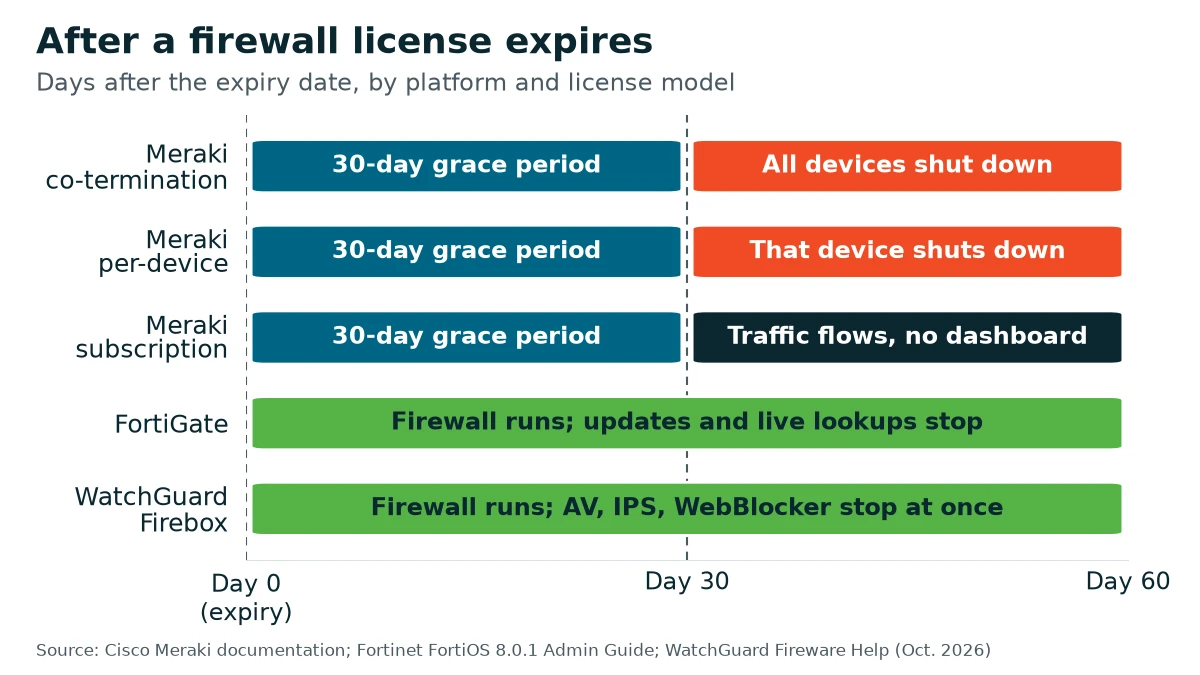
Plotted against the calendar, the 30-day mark is the line that matters on Meraki. Traffic stops at day 30 under co-termination and per-device licensing, while Meraki subscription, FortiGate, and WatchGuard keep forwarding as protection or management falls away. The TZ80 stays out of the chart because SonicWall labels its stages rather than dating each one.
Letting It Lapse Rarely Saves Anything
There’s a tempting logic to a lapse. I understand it. The box still works, the renewal lands in a tight month, so why not wait a couple of months and renew when cash is easier? It mostly doesn’t hold up. Fortinet requires coverage back to the contract expiration date. Meraki’s per-device model takes the grace days out of the new term. Either way you end up paying for the gap, and for the whole of that gap the firewall was running on old signatures, failing to filter the web, or counting down toward a shutdown, depending on whose box it is. Not a bargain.
Insurers notice, too. Renewal questionnaires have moved toward asking whether the firewall is still patched and supported, which we covered in the three security controls to have in place before an insurance renewal. A lapsed support contract makes that question harder to answer honestly. Fix that early.
Finding Your Renewal Date Before It Finds You
Every one of these platforms shows its expiry dates somewhere, whether that’s the Meraki dashboard, the FortiGuard license status on a FortiGate, the MySonicWall portal, or the License Information section of the System page in WatchGuard’s Fireware Web UI. The harder part is making sure a person sees them in time. A person, not an unread inbox.

Reminders exist. WatchGuard’s Policy Manager warns you 90, 60, 30, and 15 days before a subscription expires, and again one day before, though those particular warnings appear when someone saves a configuration to the Firebox, and anyone who wants more can set the Firebox to send expiry alerts. Under co-termination, Meraki sends an email when an organization falls out of compliance. But those notices reach whoever is logged in or listed on the vendor account. If that’s a previous IT provider, or an office manager who left two years ago, nobody hears them, and the first sign of trouble can be the lapse itself.
Term length matters more than people expect. My view on it is simple.
“It doesn’t really make sense to do a one year subscription because if you buy a three year, you’re basically paying for two years and getting an extra year.”
Vendors and resellers change their terms. So check the pricing on your own quote rather than taking my arithmetic on faith. The quieter benefit is the calendar. A three-year term means one renewal decision every three years instead of one every year, and two fewer chances to miss it. Aligning renewal dates helps for the same reason. On Meraki co-termination that cuts both ways, of course. One date also means one shutdown.
What should a managed provider be tracking? A short list, for each firewall it looks after.
- The expiry date of each security subscription and support contract, per device.
- Which license model the hardware is on, because that decides whether a lapse is an inconvenience or an outage.
- Firmware. Is the box on a current patch, and does its support entitlement still allow updates?
- Whose inbox the vendor’s reminders actually land in.
- How the web filter behaves on a failed lookup, set deliberately rather than left at whatever the default happened to be.
At VJNetworks, network security and maintenance sit inside the managed agreement, and the firewall’s subscription is one of the dates we keep in view. The renewal itself is a purchase, like the hardware, and we’ll talk it through with you well before it’s due. That’s the job.
Things People Ask About Expired Firewall Licenses
Our firewall subscription expired. Will the internet actually go down?
How long is the grace period, really?
Everything else works, but nobody can load a website. Could that be the license?
If we wait a month to renew, do we save that month?
Can a firewall run without any security subscription at all?
Where do we look up our expiry date?
Talk with our team about your firewall, the license model it’s on, and when it comes due. No cost, no obligation.