

QuickBooks Desktop vs online is a decision for each client file, and Intuit now says Desktop 2024 has no sunset deadline. The questions that matter are user count, remote access and who looks after the file.
Intuit’s own pages now treat the 2023 and 2024 lines very differently. That matters when you advise a client.
This guide is for the partner or office manager at a firm with clients in both editions, or about to have them. It sits alongside our IT for accounting firms work. We leave out the full list of what stopped working on Desktop 2023, because our post on QuickBooks Desktop and the cloud already walks through it.

QuickBooks Desktop vs Online: Where Desktop Stands in November 2026
Intuit’s own pages make three points worth knowing. The first is past. Support for the 2023 line of Desktop ended after May 31, 2026, and Intuit’s discontinuation notice lists payroll services, online banking, payment processing and critical security updates among the things that end with it.
The second is a reversal. Intuit’s help article on QuickBooks Desktop 2024, shown as updated on November 5, 2026, says that release will not be discontinued in May 2027, that Intuit is moving away from its historical three-year software lifecycle, and that there is no sunset deadline for it. Intuit commits to keep version 24.0 up to date, with support, security patches and tax-law compliance, and it asks users to accept the periodic in-product updates when prompted.
The third is older. Intuit’s stop-sell announcement says that after September 30, 2024, it would no longer sell new subscriptions to Pro Plus, Premier Plus or Mac Plus in the U.S. Enterprise is not affected, existing subscribers can keep renewing, and Intuit says the change is not a sunset of the product line. One table covers it.
| Product | What Intuit’s pages say | Also worth knowing |
|---|---|---|
| Desktop 2023 (Pro Plus, Premier Plus, Mac Plus, Enterprise Solutions 23.0) | Support ended after May 31, 2026 | Intuit says existing Plus and Enterprise subscribers receive 2024 at no extra cost as part of an annual plan |
| Desktop 2024 (Pro Plus, Premier Plus, Enterprise Solutions) | No sunset deadline, updates committed for version 24.0 | Intuit asks users to accept the in-product updates when prompted |
| Pro Plus, Premier Plus, Mac Plus | Announced: no new U.S. subscriptions after September 30, 2024, and existing subscribers can renew | Intuit says this is not a sunset of the product line |
| Desktop Enterprise | Not affected by the stop-sell, and customers can keep buying Enterprise subscriptions | Licenses go up to 40 users on the Diamond tier |
That is what Intuit’s pages said on November 17, 2026. Pages like these get rewritten. Check them again before you plan a migration around any date, ours included.
QuickBooks Desktop vs Online by Team Size
Start with a number. How many people need access to the company file? Intuit’s pricing page lists the limits. Online’s Simple Start allows 1 user, Essentials 3, Plus 5 and Advanced 25, and the page says Desktop Enterprise can scale up to 40.
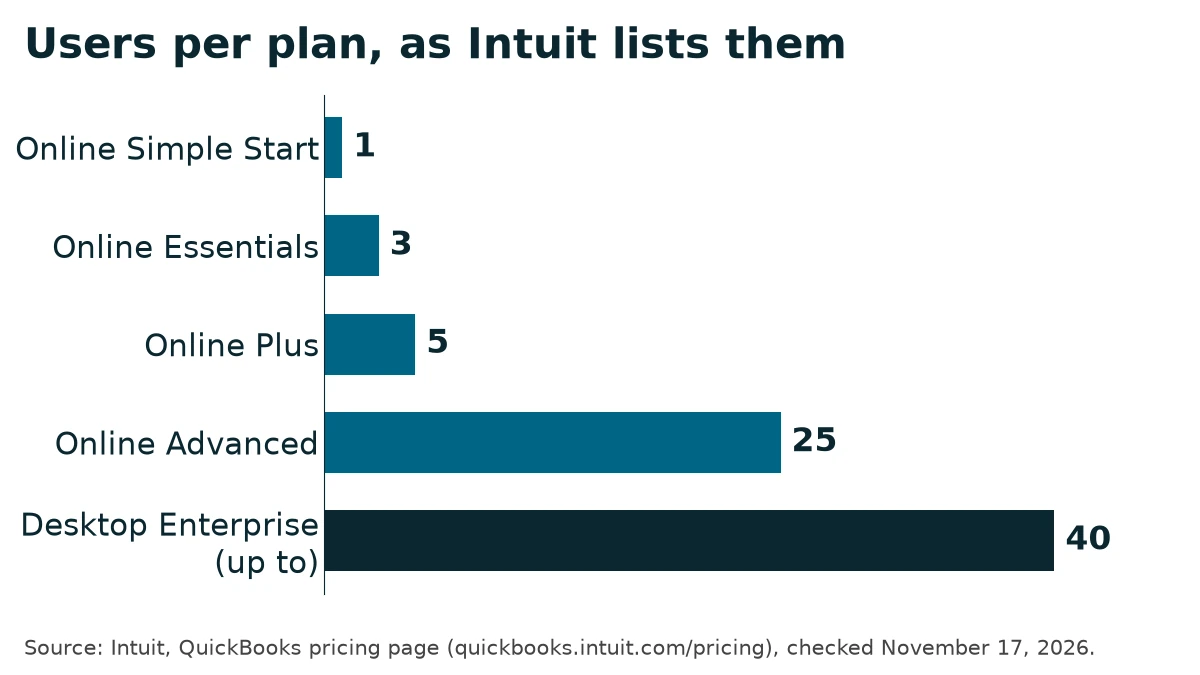
Two things follow from the listed numbers. Six people is more than the 5 users Plus lists. Twenty-six is more than the 25 Advanced lists, which points to Desktop Enterprise at up to 40, or to a different Intuit product such as Intuit Enterprise Suite. The pricing page doesn’t say whether users can be added beyond these counts. So ask Intuit first.
Your own access is a separate question. Each plan from Simple Start up lists access for two accountants, three on Advanced, and Intuit says a client can invite an accountant to collaborate for free. On the firm’s side, Intuit’s Accountant Suite page says the Core plan is free and that a firm can access client books on QuickBooks, QuickBooks Advanced and Intuit Enterprise Suite. Desktop client files are not on that list. Ask Intuit how that access works for your edition. Don’t assume.
What Does Not Move Over Cleanly
Intuit calls a move from Desktop to Online data migration. The fine print on its Desktop Enterprise page says migration is currently available at no additional cost for a limited time, and only to existing Desktop or Enterprise customers moving to Online Advanced or Intuit Enterprise Suite. It adds that a consultation is required and that some data may not be eligible for migration.
It doesn’t name the data. So check a converted copy against the original before you rely on it. Keep the original until then.
Five Questions That Settle QuickBooks Desktop vs Online for One Client
Run these for each client file. They take a phone call, not a project.
- How many people need access to the file? The chart above lists Intuit’s limits.
- Where do they work from? Online is Intuit’s cloud-based product. A Desktop file kept on an office machine can be reached from home through a remote connection or a hosted setup, and somebody has to run it.
- What else reads the file? A payroll add-on, a practice management tool, a custom report. Ask each software maker whether it works with the edition you’re considering.
- When the machine holding the file stops turning on, who restores it, and when did anyone last try?
- Who answers when it breaks?

Where the IT Side Comes In
QuickBooks makes the short list of what businesses call about first, and Mike Stoveken at VJNetworks puts it plainly: “QuickBooks and Outlook have the most application issues of any other programs.”
No chart captures that. Whichever edition a client lands on, the file lives somewhere, someone can reach it from somewhere, and someone can put it back when something fails. Those are IT questions. They are accounting questions too. VJNetworks has provided managed IT services since 2004. Which edition suits a client is a question for you and for them.
There is a third path. Running Desktop on a hosted server sits between a machine in the office and Online. That earlier post also covers how a hosted Desktop environment works and what it does to the cost per seat.
For the rest of an accounting firm’s setup, see Microsoft 365 for accounting firms.
Things Accounting Firms Ask About QuickBooks
So is QuickBooks Desktop going away?
Do we have to move every client to Online?
Can one firm work with clients in both editions?
How many users does each QuickBooks plan include?
What stopped working on Desktop 2023 after May 31?
Does Intuit help with the move to Online?
Talk with our team about where your QuickBooks files live and who can reach them. No cost, no obligation.