

QuickBooks Desktop 2023 stopped getting support on May 31, 2026. Desktop 2024 is the last Pro and Premier release. The real decision is not which QuickBooks you buy. It is where the file lives.
Two programs generate more support calls than anything else we manage. Outlook is one. QuickBooks is the other.
So when Intuit starts retiring versions of QuickBooks Desktop, it reaches my desk before it reaches the bookkeeper’s. Not because the accounting changes. Because the setup underneath it does. The company file has to live somewhere, somebody has to be able to open it from wherever they happen to be working that day, and somebody has to be able to put it back when the machine holding it stops turning on.
Here is where things actually stand. QuickBooks Desktop 2023 stopped getting support after May 31, 2026, and that date has passed. Desktop 2024 is the last Pro Plus, Premier Plus, and Mac Plus version Intuit plans to ship, and new subscriptions to any of them stopped being available in September 2024. Enterprise is still sold. For now. Everything else in the Desktop line is on a countdown.
Most of what gets written about this treats it as an accounting software decision. Pick QuickBooks Online, convert the file, done. That is one option out of three, and for a good number of the businesses we support across Rockland, Westchester, and Bergen it is the wrong one. What actually matters is where your company file lives and who can reach it, which makes this a cloud and Microsoft 365 question more than a bookkeeping one.

Ten Things That Stopped Working
Discontinuation does not mean the software stops opening. Intuit is specific about what it does mean, and the list runs longer than most people expect. Ten items.
| Service | What happened after May 31, 2026 |
|---|---|
| Live technical support | Ended. |
| Desktop Payroll, Assisted | Subscription deactivated. Intuit stopped filing tax forms on your behalf. |
| Desktop Payroll, Basic and Enhanced | No tax table updates and no payroll tax forms. Intuit warns paychecks may show inaccuracies. |
| Online bank feeds | Disconnected. |
| QuickBooks Payments | No credit card or check processing inside the product. |
| Merchant Service Deposit | No downloading card and check information in product. |
| eInvoice | Invoices carrying a pay link stop going out. |
| Emailing forms and reports | Not available from the product. |
| Accountant Copy Transfer Service | Not available. |
| Security updates | None, and this is the one that outlives all the others. |
Read that list again with an eye on payroll, because payroll is where it hurts first. Assisted subscriptions were deactivated outright, which means Intuit stopped filing on your behalf, and if nobody caught it at the time you now have a filing history with a gap in it that somebody is going to have to reconcile. Basic and Enhanced still cut paychecks. They just calculate against last year’s tax tables, and Intuit’s own wording is that paychecks may show inaccuracies. That is a payroll tax problem wearing a software costume.
The security line deserves its own paragraph. Software that stops receiving patches does not fail on a schedule. It sits there working normally, right up until somebody finds a reason to care about it. CISA tells businesses plainly to replace end-of-life software rather than run it and hope. The uncomfortable part is that an unpatched accounting file is not a dramatic failure you can point at during a budget meeting but a quiet accumulation of risk that stays invisible right until the week it is not. No client of ours has been hit that way in over 20 years, and I plan to keep that record intact.
The Date Most Guides Have Wrong
Now the part where I disagree with nearly everything published on this topic.
Search for when Desktop 2024 loses support and you will land on September 30, 2027 over and over. Vendor blogs, conversion-tool marketing, and a few accounting newsletters all carry the same September figure, and once a number gets repeated enough times it stops being checked and starts being assumed. I do not buy it.
Intuit has retired Desktop versions on the same schedule three years running. Desktop 2021 went dark after May 31, 2024. Desktop 2022 after May 31, 2025. Desktop 2023 after May 31, 2026. Three years from release, always the last day of May. Intuit’s own support staff have answered the 2024 question with May 31, 2027, and Intuit has not published a dedicated 2024 policy page yet, which is exactly why the guesswork filled the gap.
September 30 is a real Intuit date. It is the day in 2024 they stopped selling new Desktop subscriptions. Two different things. My read is that somebody crossed the two wires early and everybody else copied it.
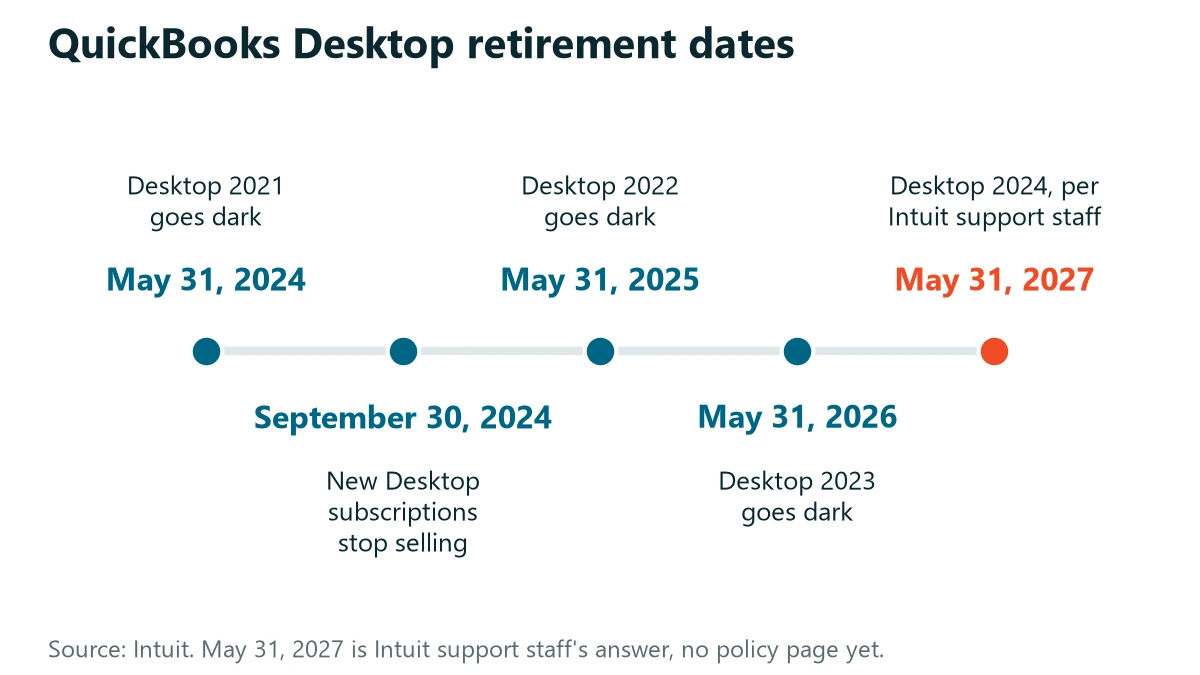
Four months is not a rounding error when you are scheduling a migration around a fiscal year close. Plan for May. If Intuit later publishes something that buys you until September, you will simply have finished early.
Your Books Are Not the Problem. The Box Is.
Picture a normal QuickBooks Desktop setup in a twenty-person office.

The company file sits on a server in a closet. Sometimes it sits on the office manager’s desktop, which is worse and more common than anybody likes to admit. Three or four people open it over the network. A backup runs somewhere on a schedule nobody has looked at in a while, and the honest version, the one I get after a few minutes of conversation rather than the one I get in the first answer, is that nobody has actually restored from it. When someone works from home they remote into a machine at the office, or they do not work.
Intuit’s release calendar did not create any of that. It was already fragile. The discontinuation just supplies a date, and a date is the only thing that reliably gets a project funded.
So the first question I ask is not which QuickBooks you should buy. It is how many other things break the day that closet server dies. The answer is almost never just QuickBooks. It is the estimating package, the practice management software, and the shared drive sitting on the same hardware, which turns into a file server decision of its own.
Where Desktop Users Actually Go From Here
Three options. Two of them are real for most small businesses, and the third depends entirely on what else you run alongside the accounting file.
QuickBooks Online fits small teams with straightforward books who want out of hardware. Desktop Enterprise fits businesses that need Desktop specifically and can absorb the price, and Intuit calls it their Desktop solution going forward. Desktop hosted in Azure fits teams with software tied to the file, multiple sites, or a server due for replacement anyway. QuickBooks itself does not change. The infrastructure does.
Enterprise buys you room rather than an exit, and if the reason you are on Desktop is a piece of software that reads the company file directly, that room is worth having while you sort out the rest of it. The Online path deserves one warning that rarely survives the sales conversation. Some Desktop features do not make the trip, inventory and job costing are the usual casualties, and the discovery that a report your controller rebuilds every month no longer exists tends to arrive well after the conversion is finished. By then the old file is an archive you read rather than a system you run.
| Option | Fits | Worth knowing |
|---|---|---|
| QuickBooks Online | Small teams with straightforward books who want out of hardware | Some Desktop features do not make the trip. Inventory and job costing are the usual casualties. |
| Desktop Enterprise | Businesses that need Desktop specifically and can absorb the price | Buys you room rather than an exit. Enterprise versions still age out on the same annual schedule. |
| Desktop hosted in Azure | Teams with software tied to the file, multiple sites, or a server due for replacement anyway | Raises the cost per seat significantly, and builds disaster recovery right into the system. |
What Putting QuickBooks in Azure Actually Changes
The objection to QuickBooks Online is almost never technical. It is that the bookkeeper knows where everything is and has no appetite for relearning it at year end. Hosting Desktop in Azure sidesteps that, because the interface your people open tomorrow is the interface they opened yesterday. Same buttons.
Two things change that are worth paying for.
Multi-user access stops depending on the office network. Somebody sitting at a client site opens the same file the same way as somebody sitting twenty feet from where the server used to be, and neither of them has to think about mapped drives or whether the office internet is having a bad afternoon.
Disaster recovery stops being a separate project. Recovery is the real prize here. On a closet server, backup and recovery are something you bolt on afterward and hope you configured correctly. In an Azure environment, recovery is part of how the thing is built. Moving to an Azure environment with a session host raises the cost per seat significantly, and it also builds disaster recovery right into the system.
That is not an accounting firm point alone. One of the setups I would point to first is a construction company with no compliance framework driving any of it. They went that direction because their people are not in one building. The delivery model moves the price more than the industry does. Not the vertical.
The mechanics of that move are the same Azure and Microsoft 365 migration work we do for everything else, and the recovery side belongs with backup and disaster recovery rather than being treated as a QuickBooks feature.
QuickBooks Desktop on a closet server vs. hosted in Azure
On a server in a closet
- Three or four people open the file over the network.
- Working from home means remoting into a machine at the office, or not working.
- A backup runs on a schedule nobody has looked at in a while.
- Recovery is something you bolt on afterward and hope you configured correctly.
Desktop hosted in Azure
- The interface is the one your people opened yesterday. Same buttons.
- Multi-user access stops depending on the office network.
- Recovery is part of how the thing is built.
- The cost per seat goes up significantly.
Before You Pick Anything, Get These Five Answers

- Which Desktop version are you actually running? Not which one you bought. The Help menu, then About, shows it in two seconds.
- Is payroll running through QuickBooks? This moves the urgency more than anything else on the list.
- What else lives on that same server? Price the move for all of it, not just the accounting file.
- How many people need the file at once, and from where?
- When did somebody last restore a backup and confirm the restored file opened? Not run a backup. Restore one.
That last one catches people. Running backups and having recoverable backups are different claims, and only one of them is worth anything on a bad morning. The businesses that come through this cleanly are the ones that treated it as an infrastructure project with an accounting deadline attached, rather than an accounting project that happened to involve a server nobody wanted to think about.
Questions We Get About This One
Will my QuickBooks Desktop just stop opening?
Do I have to move to QuickBooks Online?
Is QuickBooks Enterprise safe from all of this?
What does it cost to move QuickBooks into Azure?
We already missed May 31. How bad is that?
We will look at the version you are on, what else is sitting on that same hardware, and what moving it would actually cost. No obligation, and if the answer is that you should stay put for now, we will tell you that.