

Most accounting firms already own more Microsoft 365 security than they have switched on. Business Premium covers what a CPA practice needs. The expensive add-ons usually do not apply to you.
I get asked some version of this question every fall. A firm is coming up on renewal, somebody has quoted them an upgrade, and they want to know whether they need it. Do we have to move up to E5?
Usually not.
Not even close, most of the time.
What they need is for somebody to open the tenant they are already paying for, walk through the security and compliance settings one screen at a time, and switch on the eight or nine things that have been sitting there unconfigured since the day the licenses were bought. Less exciting than buying a bigger license. Also true. All of these compliance outlines and frameworks are built on the same handful of ideas anyway. It is a matter of which plug-and-play components a practice actually needs, not which acronym the salesperson leads with.
So this is a configuration guide. Not a pitch. Not a cost breakdown, and not a security lecture either. What to set up in a Microsoft 365 tenant for an accounting firm, what to leave alone, and where the license stops being able to help you.

Start From the License You Own
Microsoft 365 Business Premium is where nearly every firm under 300 people should be sitting, and 300 is a hard ceiling rather than a suggestion. Microsoft caps the entire Business family at 300 seats across all Business plans. Cross that line and the conversation changes completely. Different plans, different pricing, different everything.
Under the ceiling, Business Premium carries more than most owners realize. Microsoft’s own documentation is the place to check this rather than a reseller’s comparison chart, partly because the chart is usually built to sell the next tier up and partly because the feature names change often enough that a chart printed eighteen months ago is describing a product that no longer exists under that name.
| Control | Included in Business Premium? | What it gives a firm |
|---|---|---|
| Microsoft Entra ID P1 | Yes | Conditional Access, which is the whole reason to care |
| Defender for Office 365 Plan 1 | Yes | Safe Links, Safe Attachments, impersonation protection |
| Intune Plan 1 and Defender for Business | Yes | Device management and endpoint security, including personal phones |
| Data loss prevention for email, SharePoint, OneDrive | Yes | Rules that catch a Social Security number leaving the building |
| Retention policies | Yes | Keep client mail for as long as your engagement letters commit to |
| Message Encryption | Yes | Encrypted delivery to a client who does not run Microsoft 365 |
| Sensitivity labels, applied by hand | Yes | A preparer marks a return confidential and the file carries it |
| Sensitivity labels, applied automatically | No | Needs E5 or a Purview add-on. This is the upsell. |
| Entra ID P2, risk-based sign-in policies | No | Comes with the Defender Suite add-on, bought separately |
Look at the yes column. Read it twice. Encrypted email, retention, DLP, Conditional Access, device management. That is a working control set for a tax practice. A firm on Business Premium bought all of it months or years ago. Most of it is still off.
Microsoft builds everything into 365 and then gates it by license. Some come with every plan. A lot are tied to one. And occasionally you need an add-on built to sit on top of another add-on, which is as silly as it sounds. Knowing which side of the line a feature sits on is most of the job.
SharePoint, Not OneDrive
If you read nothing else here, read this part.
It is not a licensing question. It is a habit.
Most firms use some form of OneDrive when they should be using SharePoint a lot more. OneDrive is the user-based version. SharePoint is the company version. That is the whole distinction. In an accounting practice, almost nothing is genuinely one person’s file, and yet the working papers keep landing in one preparer’s personal storage anyway, mostly because that was the folder sitting on their laptop the day they started and nobody has ever given them a reason to save anywhere else.
Microsoft is direct about the consequence. When somebody leaves and their account is deleted, their OneDrive files go with them. Files in SharePoint stay. They belong to the site, not the person. Now think about the seasonal preparer you hired in January, handed a laptop and a mailbox, leaned on hard through April, and offboarded in May, then ask yourself where their client workpapers are actually sitting right now.
That is not a theoretical risk. It is the version of this that actually shows up, and it shows up the week after somebody leaves.
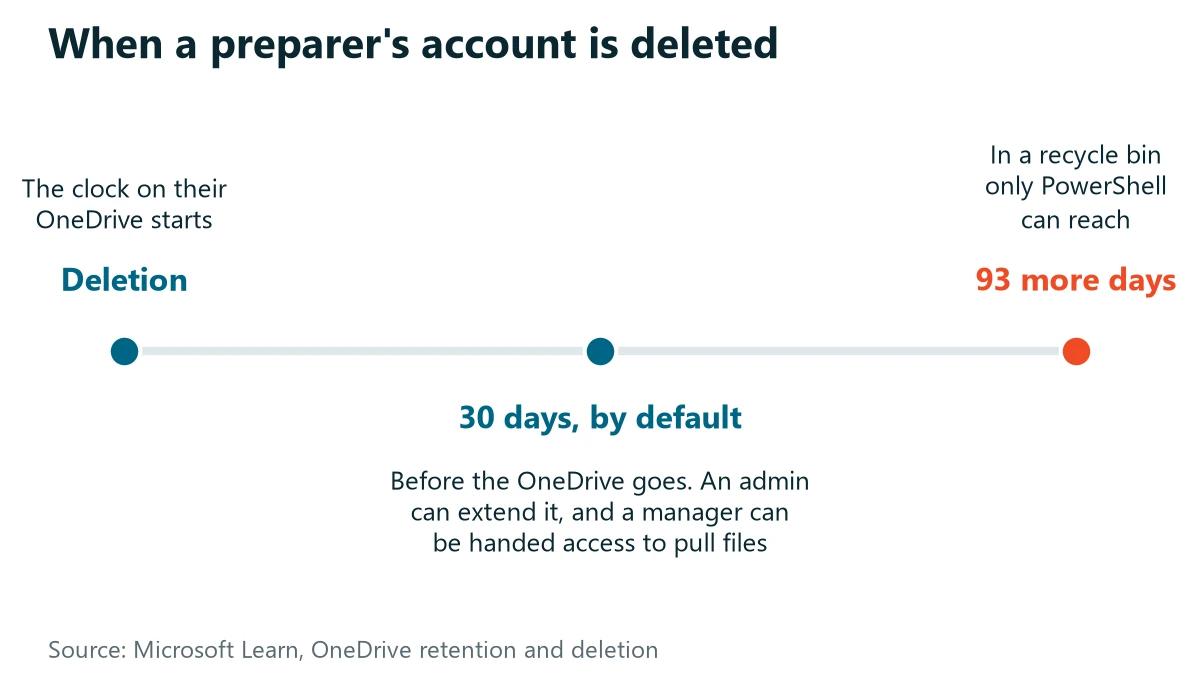
Build the structure by how the firm works. A site for tax, a site for audit or attest, a site for bookkeeping clients, a site for firm administration, and permissions that follow the engagement rather than the individual, so that adding somebody to a job adds their access along with it. Keep OneDrive for drafts and scratch work. That is it. Everything a second person might ever need to open belongs in SharePoint. We wrote about the wider version of this decision in the piece on moving a file server into SharePoint, and the file structure question is the part firms consistently underinvest in.
One caution. Do not treat SharePoint as a place to run applications from. More on that below.
Nine Settings for the First Week
None of these cost extra on Business Premium. Not one. Between them they take an afternoon, assuming somebody knows where the switches live.
- Replace security defaults with Conditional Access. Security defaults turns on MFA for everybody and stops there. Conditional Access is what lets you say that a sign-in from outside the country gets a second look, that an unmanaged personal laptop can read a document in the browser but never download it, and that the finance mailbox is treated differently from everybody else’s.
- Enforce MFA on every admin account before Microsoft does it for you. That has already begun. Microsoft has been rolling out mandatory MFA for the admin center in phases, and the enforcement ramps have landed in February. That is the worst possible month for a tax firm to discover an admin account cannot sign in.
- Keep one break-glass admin account out of the Conditional Access policies. Tenant lockouts almost always trace back to a policy written with no exceptions.
- Turn on DLP for email and SharePoint and point it at Social Security numbers and bank account numbers. Run it in warn mode first. You will learn things. Some of them will bother you.
- Set retention on mail and on SharePoint to match what your engagement letters actually say. Not what feels careful. What the letter says.
- Publish two or three sensitivity labels and stop. Internal, Client Confidential, maybe one more. Twelve labels means nobody uses any of them. Nobody.
- Configure Message Encryption so a preparer can encrypt outbound mail without installing anything. The clients who need it most are usually the ones running an email address from 2004.
- Enroll firm-owned machines in Intune, and use app protection policies rather than full management for personal phones. Nobody wants their own phone wiped over a mailbox.
- Switch on Safe Links and Safe Attachments through the Standard preset policy. It sits on the Defender side. It is included. A surprising number of tenants have never had it enabled.
Two of those deserve a note. The break-glass account is the one people skip because it feels like leaving a door unlocked, and then a token expires on a Saturday and the only global admin is on a plane. And the DLP warn mode matters because a rule that starts by blocking mail during March will be switched off by March 3.
What to Skip
The list of things not to buy is shorter than the list of things to configure, which tells you something.
Automatic sensitivity labeling is the big one. Microsoft’s service description is unambiguous that automatic and policy-based labeling requires an E5 license or a Microsoft 365 Information Protection and Governance add-on, while manual labeling is included in Business Premium. For a twelve-person firm where four people touch client documents, manual labeling with three labels does the job. Automatic classification is genuinely useful at a few hundred users and mostly theater below that.
Skip adaptive policy scopes for retention, which are also E5. A static policy covers a firm your size. Easily.
Skip insider risk management. Not yours. It is built for organizations that need to detect a departing employee moving data out across thousands of accounts. You need to notice one person copying a client list, and you notice that through DLP alerts and offboarding discipline rather than a behavioral analytics engine.
Skip the E5 conversation entirely unless something specific is driving it. If a firm cannot name the feature it is buying and the requirement that feature satisfies, the upgrade is not ready to happen.
And skip enabling every Defender policy at maximum strictness on day one. Quarantine sitting on top of a tax practice in filing season creates a support problem that undoes any goodwill the project earned. Standard preset first. Strict later. Or never.

Where Microsoft 365 Stops
Here is the part that gets skipped in every article written about this by somebody who has not supported an accounting firm.
It matters more than the rest of it.
Your tax software is not a Microsoft 365 workload. It never was. CCH ProSystem fx and ProSeries are database-backed desktop applications that expect consistent, direct access to their own files. They do not belong in a synced folder, and the failure mode when you put them there is not a clean error message. It is a corrupt file, discovered by whoever opens the return next. Usually in March.
Intuit is blunt about it in their own documentation. In their hosted environment, the OneDrive and SharePoint apps are not available, mapping either one to a drive letter is not supported, and support will not troubleshoot it if you do it anyway. That is the vendor telling you where the boundary sits. Believe them.
So the shape of a working accounting firm environment is two things side by side. Two systems. One boundary. Microsoft 365 holds email, Teams, and every document that is not the application’s own data. The tax and engagement software runs where it is supposed to run, on a server or in a hosted or Azure environment, and that decision is an infrastructure question rather than a Microsoft 365 one. If a provider tells you they will just put ProSeries in SharePoint, that is a real signal about the rest of their advice.
Two systems, one boundary
Microsoft 365
- Teams
- Every document that is not the application’s own data
Tax and engagement software
- CCH ProSystem fx and ProSeries are database-backed desktop applications
- Runs on a server or in a hosted or Azure environment
- Does not belong in a synced folder
- In Intuit’s hosted environment, the OneDrive and SharePoint apps are not available and mapping either one to a drive letter is not supported
The other honest thing to say here is which programs actually generate the calls. QuickBooks and Outlook have more application issues than any other software we support. Not the tax software. Not the network. Those two. Whatever you configure in Microsoft 365, budget for the fact that Outlook is going to be a recurring conversation, and pick a provider whose response commitment you believe. The VJNetworks commitment is fifteen minutes, and we set it there deliberately so that most of the time we beat it.
How This Maps to Your WISP
Every one of these settings is doing double duty. Owners rarely realize it.
The IRS has been explicit for several years that tax professionals must have a Written Information Security Plan, and it points to Publication 5708 for a template. The requirement flows from the Gramm-Leach-Bliley Act. Not from the IRS, oddly enough. Under it, tax and accounting professionals are treated as financial institutions, which surprises a good number of the owners I say it to.
The FTC’s Safeguards Rule then names specific controls. Multi-factor authentication for anyone accessing an information system. Encryption of customer information at rest and in transit. Access controls that get reviewed rather than set once in 2019 and forgotten. Those live at 16 CFR 314.4, and the FTC is clear that it is the activity that makes you a covered financial institution, not what you call yourself.
Read that list again next to the nine settings above. Conditional Access with MFA. Message Encryption and encryption at rest that Microsoft provides by default. Permissions that follow the engagement. The configuration is the compliance work. That is the whole point. What the WISP does is write it down, name the person responsible, and give you something to hand over when a client’s cyber insurer asks. Smaller firms get relief from a few specific paragraphs of the rule based on how many consumers they hold records for, and that carve-out is narrower than most people assume, so read it rather than repeating what somebody told you at a conference.
I am not going to pretend a license makes you compliant. It does not. Never has. It gives you the components, and somebody still has to assemble them and write down what they did.
The Order I Would Actually Do This In
Inventory first. Always. Who has what license, which accounts still exist for people who left, and where the client files currently live. That step takes an hour and it reshapes everything after it.
Then identity. Conditional Access, MFA, the break-glass account, admin cleanup. Four items.
Then the file move into SharePoint, which is the part that takes real time and real communication with staff, and which nobody should attempt between January and April. If you are also moving off an old server, the migration itself has its own sequence worth reading first.
Then data controls. DLP, retention, labels, encryption.
Then devices. Then the Defender presets. Save the tax season readiness checks for their own conversation, because the questions to ask before filing season are a different exercise from tenant configuration and deserve their own meeting.
The order for setting up Microsoft 365 for an accounting firm
- 1Inventory Who has what license, which accounts still exist for people who left, and where the client files currently live. That step takes an hour.
- 2Identity Conditional Access, MFA, the break-glass account, admin cleanup.
- 3File move into SharePoint Takes real time and real communication with staff. Not between January and April.
- 4Data controls DLP, retention, labels, encryption.
- 5Devices Firm-owned machines in Intune, app protection policies for personal phones.
- 6Defender presets Standard preset first. Strict later.
Twenty two years in, the pattern I keep seeing is that firms buy protection and never finish switching it on. The gap is not budget. It rarely is. It is that nobody owned the last 20 percent of the setup, and the last 20 percent is where the controls actually live. If you are still weighing up who handles this, our notes on choosing an IT provider for a CPA practice cover what to ask, and the broader accounting firm IT page lays out how VJNetworks approaches the vertical.
Things Partners Ask Before They Sign Off
We are eleven people. Is Business Premium honestly enough?
Our preparers keep everything in their own OneDrive. How bad is that?
Can we run ProSeries or ProSystem fx out of SharePoint to avoid the server?
Do sensitivity labels do anything if nobody applies them?
What actually breaks when we switch security defaults off for Conditional Access?
How long does this whole configuration take?
We will review your tenant against this list and tell you which settings are missing and which purchases you do not need. No obligation, and if your setup is already sound we will say so.