

Microsoft MFA enforcement covers the Microsoft 365 admin center, the Azure, Entra and Intune portals, and changes made through Azure’s command-line tools. Any user account that signs in to manage them, break-glass accounts included, has to complete MFA.
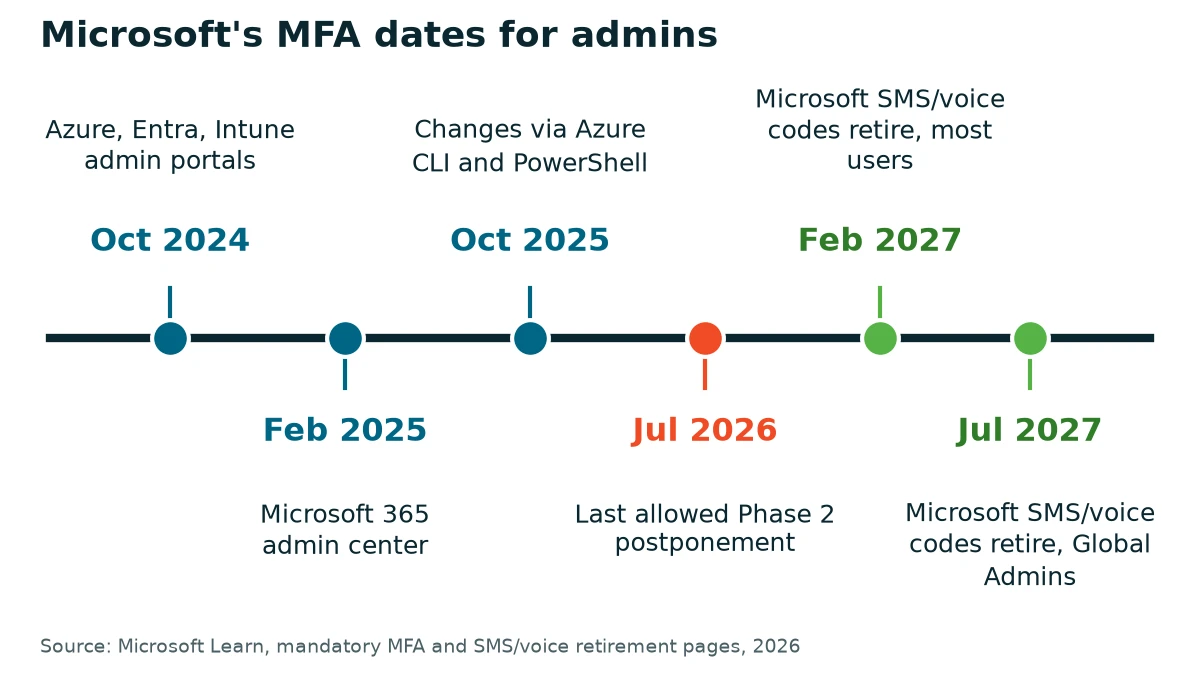
Most of the dates are already behind us. Microsoft began enforcing MFA at the Azure, Entra and Intune admin portals in October 2024, added the Microsoft 365 admin center in February 2025, and began extending it to Azure’s command-line and API tools on October 1, 2025. Each step rolled out gradually, tenant by tenant, so yours may have switched on at a different time than the business next door.
That changes the useful question. It’s no longer what’s coming. It’s what this did to the people who hold admin rights in your tenant, and whether anybody checked. In a small business, that might be the owner, an office manager, or an outside IT provider. I’m writing this one for them. It sits inside our wider cybersecurity guidance for small businesses, and it covers the admin side only.

What Microsoft MFA Enforcement Covers, and When It Started
Microsoft’s own mandatory MFA page splits the rollout into two phases. The table follows it.
| Where you sign in | What needs MFA | When it began |
|---|---|---|
| Azure portal, Microsoft Entra admin center, Microsoft Intune admin center | Create, read, update or delete actions | Starting October 2024 |
| Microsoft 365 admin center | Signing in at admin.microsoft.com, admin.cloud.microsoft or portal.office.com/adminportal | Feb. 2025 |
| Azure CLI, Azure PowerShell, Azure mobile app, infrastructure-as-code tools, REST API and SDKs | Create, update or delete actions. Reads don’t need it | Starting October 1, 2025 |
| Not covered | Workload identities such as managed identities and service principals, the Microsoft Entra Connect sync account, and Microsoft Graph PowerShell and APIs, at this time | Not in scope |
The Microsoft 365 start date was February 3, 2025, according to Microsoft’s announcement, and tenants were meant to get a Message center notice about 30 days before they became eligible, though an organization with several tenants can be switched on at different times. Unregistered users aren’t locked out, Microsoft says. They’re prompted to register when they reach the admin center.
There was never an opt-out. Microsoft’s FAQ is blunt about it: “There’s no way to opt out.” A delay option did exist: Microsoft let tenants with technical barriers postpone Phase 1 until September 30, 2025 and Phase 2 until July 1, 2026, and that latest date has passed, though once Phase 2 enforcement begins, a Global Administrator can still ask Microsoft Help and Support to lift it temporarily. That’s a bridge. Not a plan.
Break-Glass Accounts Are Not Exempt From Microsoft MFA Enforcement
A break-glass account is a spare Global Administrator login kept for the day nobody can sign in the normal way. Microsoft calls it an emergency access account, and says to restrict its use to the times when it’s absolutely necessary.
Microsoft’s FAQ leaves no room. For the portals and tools it covers, enforcement applies to all user accounts, “regardless if they are a student account, break-glass account, an administrator account with activated or eligible roles, or any user exclusions that are enabled for them.” Microsoft’s reasoning is that each of those accounts can perform resource management in Azure, so each poses the same risk if it’s compromised, and its preparation guidance adds that exceptions or exclusions in your MFA policy “no longer apply.”
Picture an emergency account at a 15-person office set up like this. A 30-character password sealed in an envelope, and the account excluded from every Conditional Access policy so nothing can ever block it. At the admin portals the password alone no longer gets it through. Microsoft says an account with no MFA method gets prompted to register one, which means setting up the emergency sign-in in the middle of the emergency.
| Setting | An emergency account that fails | One that matches Microsoft’s guidance |
|---|---|---|
| Sign-in method | A long password and nothing else | A passkey (FIDO2), or certificate-based authentication if you already run the certificates |
| Who it depends on | A code sent to one employee’s phone | Credentials held in secure places, tied to no individual and no personal device |
| Conditional Access | Excluded, with no MFA behind it | Excluded from policies that block or restrict sign-in, and still passes MFA |
Microsoft counts a passkey or a certificate as MFA, and its emergency access guidance asks for a method unlike the one your regular admins use. Its own list of reasons for these accounts includes a cell network outage and the last Global Administrator leaving the company.
Keep the exclusion anyway. Microsoft still wants emergency accounts left out of Conditional Access policies that block or restrict sign-in, and report-only policies don’t need one. The exclusion shields the account from your rules, while the passkey answers Microsoft’s.
I’ve covered where this account sits in the order of work, and what happens when a business loses its last admin, in our IT roadmap for a 20-person business. The ownership side is in who owns the company Microsoft account.
Check Whether Microsoft MFA Enforcement Already Reached Your Tenant
Four checks, in this order. The first two need a Global Administrator.
- Sign in to the Azure portal as a Global Administrator and open the Phase 1 page Microsoft links from its mandatory MFA article (aka.ms/managemfaforazure). Microsoft says a banner there confirms that enforcement began for your tenant.
- Open the Phase 2 page (aka.ms/postponePhase2MFA) the same way and look for the same banner.
- Find out how MFA is being enforced today. The options are security defaults, a Conditional Access policy that requires MFA, or per-user settings. Conditional Access needs Microsoft Entra ID P1 or P2, and Microsoft points tenants without it to security defaults. A tenant created on or after October 22, 2019 may already have security defaults switched on.
- Read the Entra sign-in logs. Microsoft says they name the application that enforced MFA as the source of the requirement.
Step three comes back empty? Microsoft recommends a Conditional Access policy or security defaults so that people satisfy MFA before they see an error. Know what security defaults change before you switch them on. Every user in the tenant has to register for MFA, legacy authentication protocols are blocked, and a tenant that moves to its own Conditional Access policies has to turn security defaults off.
What a Small Tenant Must Have in Place
Asked for the controls a business needs before an insurance renewal, I put it this way: “MFA on your public facing accounts, that’s definitely one.” In the roadmap order I recommend, locking down admin accounts and setting up a break-glass Global Administrator comes right after MFA on internet-facing accounts. Microsoft’s own guidance turns that step into six things.
- Every admin account signs in with MFA. The owner’s account too.
- Global Administrator held by fewer than five people, which is Microsoft’s recommendation, and every other admin given only the permissions the job needs.
- Two break-glass accounts built the way Microsoft describes them. Cloud-only, on the onmicrosoft.com domain, with the Global Administrator role assigned as permanent and active. A passkey (FIDO2) or certificate-based sign-in that differs from everyday admin sign-in. Credentials stored in secure, separate places. An alert whenever either account signs in (Microsoft’s example uses Azure Monitor), and a test of both at least every 90 days, which is Microsoft’s interval.
- Security defaults or a Conditional Access policy doing the enforcing, so MFA doesn’t hang on Microsoft’s switch alone. Which one you can use depends on your license, and our comparison of which Microsoft 365 license carries the security features you need covers that.
- Scripts and scheduled jobs off personal logins. A user account that runs scripts or other automated tasks against those Azure tools has to complete MFA once enforcement begins. Microsoft’s answer is a workload identity, which this enforcement doesn’t touch.
- Current command-line tools for anyone who runs them. Microsoft says to use Azure CLI 2.76 and Azure PowerShell 14.3, or later, for the best compatibility.

MFA is the floor. What goes on top of it is the subject of our piece on why MFA alone isn’t enough. And if you’d rather not own any of this, managing and securing Microsoft 365 is part of a VJNetworks managed IT agreement when we run the platform for you.
Text-Message Codes Run on a Separate Clock
A different Microsoft change touches admin sign-in on its own schedule. According to Microsoft’s retirement page, Microsoft-provided SMS and voice codes retire on February 1, 2027 for most users and on July 1, 2027 for Global Administrators and external users, and after the date that applies to them, anyone whose only MFA method is SMS or voice has to register a passkey to keep signing in, with no opt-out on that prompt. The later date holds only while the Global Administrator role is active, Microsoft’s FAQ says, and being eligible for the role doesn’t qualify. Organizations that need telephony can set up a paid provider from the Microsoft Security Store from October 30, 2026.
Different deadline. Same advice. A Global Administrator who relies on a text code has a few extra months, not a pass, and the passkey on a break-glass account covers both changes.
Things Owners Ask Before They Touch Anything
Can an emergency account just be left out of the MFA rule?
We asked Microsoft for more time. Is that still running?
Do I have to buy Conditional Access to comply?
Does this put MFA on everyday email and Teams for my staff?
What about scripts and scheduled jobs that sign in with a person’s login?
What happens to an admin who never registered MFA?
Talk with our team about admin MFA and emergency access for your Microsoft 365 tenant. No cost, no obligation.