

Microsoft 365 Business Premium adds the security tools that Business Basic and Business Standard leave out, including Conditional Access through Entra ID P1, Intune, Defender for Business, data loss prevention, sensitivity labels, and Message Encryption. Standard’s step up from Basic is mainly the desktop apps, not stronger protection.
Microsoft does sell some security products on their own, Defender for Business among them. For a typical small office, though, protection arrives through the plan, and Microsoft decides, plan by plan, which pieces come in the box.
“They build everything into 365. If you need to meet certain compliance frameworks, you have to purchase the right licence that gives you access to those features. Some are included in every licence, but a lot are tied to specific licences, and sometimes you need an add-on licence that’s made to go along with another licence.”
Mike Stoveken, VJNetworks
That is the buying decision in four sentences. Everything below is checked against Microsoft’s own service descriptions, not a reseller’s chart. Feature names move. Charts age fast.
VJNetworks sells Microsoft 365 licenses and manages the tenants afterward as part of our Microsoft 365 and cloud services, so the question of which plan a business is on comes up at every onboarding.

What Basic and Standard Already Protect
Microsoft 365 Business Basic and Business Standard share one security baseline. Both include Microsoft Entra ID Free with security defaults, Exchange Online Protection for spam and malware filtering, Basic Mobility and Security for phones, a 50 GB archive mailbox, and standard audit logging. Standard adds the desktop Office apps and self-service password reset for cloud accounts, but none of the protections in the table below.
Don’t dismiss that baseline. Security defaults cost nothing. Zero. Microsoft’s own security defaults documentation lists what they switch on. The list includes MFA registration for every user, MFA for administrators every time they sign in, MFA for everyone else when Microsoft judges it necessary, blocks on legacy authentication and device code sign-in, and extra checks on Azure management tools. Microsoft states the goal plainly, which is that every organization should have “at least a basic level of security enabled at no extra cost.” New tenants get them switched on at creation. Older tenants may not. Is yours on?
Basic Mobility and Security is the other free piece. Microsoft describes it as a subset of Intune. A small one. It can require a passcode on a phone, block a jailbroken one, and wipe company data from a lost device. What it can’t do is a longer list. No Windows Autopilot. No app protection policies for personal phones. No Wi-Fi or VPN profiles, no BitLocker key recovery, and device-compliance access rules don’t work on Windows PCs at all.
One change is rolling out now. Microsoft’s 2026 packaging update, announced in February and rolling out from June, adds what Microsoft calls URL time-of-click protection to Basic and Standard. Safe Attachments, the detonation of suspicious files before delivery, still comes with Defender for Office 365 Plan 1, which Premium includes. Different feature. Different plan.
So that’s a real floor. It’s still a floor.
What Business Premium Adds, Feature by Feature
The table below lines up the security features small businesses tend to ask about across the three plans. “Add-on” means Microsoft sells the feature separately for that plan, per user.
| Security feature | Basic | Standard | Premium |
|---|---|---|---|
| Security defaults (MFA for everyone) | Yes | Yes | Yes |
| Conditional Access (Entra ID P1) | Add-on | Add-on | Included |
| Device management | Basic MDM | Basic MDM | Intune Plan 1 |
| Windows Autopilot | With add-ons | With add-ons | Included |
| Endpoint detection and response (Defender for Business) | Add-on | Add-on | Included |
| Safe Attachments and Defender anti-phishing (Defender for Office 365 Plan 1) | Add-on* | Add-on* | Included |
| Data loss prevention for email and files | Add-on | Add-on | Included |
| Purview Message Encryption | Add-on | Add-on | Included |
| Sensitivity labels, applied by hand | Add-on | Add-on | Included |
| Sensitivity labels, applied automatically | Two add-ons | Two add-ons | Add-on |
| Retention policies for mail and SharePoint | Teams messages** | Teams messages** | Included |
| Archive mailbox | 50 GB | 50 GB | 100 GB, expands to 1.5 TB*** |
| Risk-based sign-in policies (Entra ID P2) | Add-on | Add-on | Add-on |
* Basic and Standard get URL time-of-click protection in the 2026 update. The rest of Plan 1 is an add-on. ** Mail retention there needs Exchange Online Archiving or Exchange Online Plan 2. *** Premium’s archive starts at 100 GB. Grows toward 1.5 TB once auto-expanding archiving is turned on.
Every row comes from Microsoft. The data protection rows and the Azure Information Protection Plan 1 route come from the Microsoft Purview service description, the other add-on cells from Microsoft’s small-business plan comparison published June 1, 2025, and the archive sizes from the Exchange Online limits page.
Conditional Access Is the Row to Read First
Security defaults are a single switch. On or off. Same rules for everyone, no exceptions. Conditional Access, which needs at least Entra ID P1, lets you write the rules yourself, so a sign-in from an unmanaged laptop can read a document in the browser without downloading it, a sign-in from another country gets challenged, and the finance mailbox gets stricter treatment than the front desk’s. Microsoft’s guidance is unusually direct here, saying that an organization with P1 or P2 licenses will find security defaults “probably not right for you.” Take the hint.
Devices and Endpoints
Premium includes Intune Plan 1 for Windows, Mac, iOS, and Android devices (Intune Plan 2 and the Intune Suite, with extras such as Remote Help, are sold separately), and with it Windows Autopilot, which sets up a new laptop with the company’s apps and policies when the user first signs in. Microsoft’s Autopilot requirements list Business Premium as a qualifying subscription. On Basic or Standard you would need Entra ID P1 plus an Intune subscription to get there.

Defender for Business is Microsoft’s endpoint detection and response product for companies up to 300 employees, and it ships inside Premium. On endpoint protection I don’t hedge.
“You definitely want EPR [endpoint detection and response] on all your workstations and servers. If you don’t have something like that, you’re just asking for it, really.”
Mike Stoveken, VJNetworks
Note the word servers. Easy to miss. A Premium license covers users and their devices, not your file server. Microsoft sells a separate Defender for Business servers add-on, and buying it requires at least one Business Premium or standalone Defender for Business license, with a cap of 60 server licenses per customer. That’s an add-on built to sit on top of another license, the same pattern as the quote at the top. Premium includes one EDR. Whether you run Microsoft’s or another vendor’s is a separate call your IT provider should make with you.
Microsoft 365 Business Premium vs Standard Plus Add-Ons
Buying Standard and bolting on the pieces you need sounds thrifty. Is it? The arithmetic often says otherwise.
Since July 1, 2026, Microsoft’s list prices are $7 per user per month for Business Basic, $14 for Business Standard, and $22 for Business Premium, according to Microsoft’s 2026 Microsoft 365 pricing update. Basic and Standard went up. Premium didn’t. Entra ID P1 lists at $7 a month, paid yearly, on Microsoft’s Entra pricing page, and standalone Defender for Business at $3.
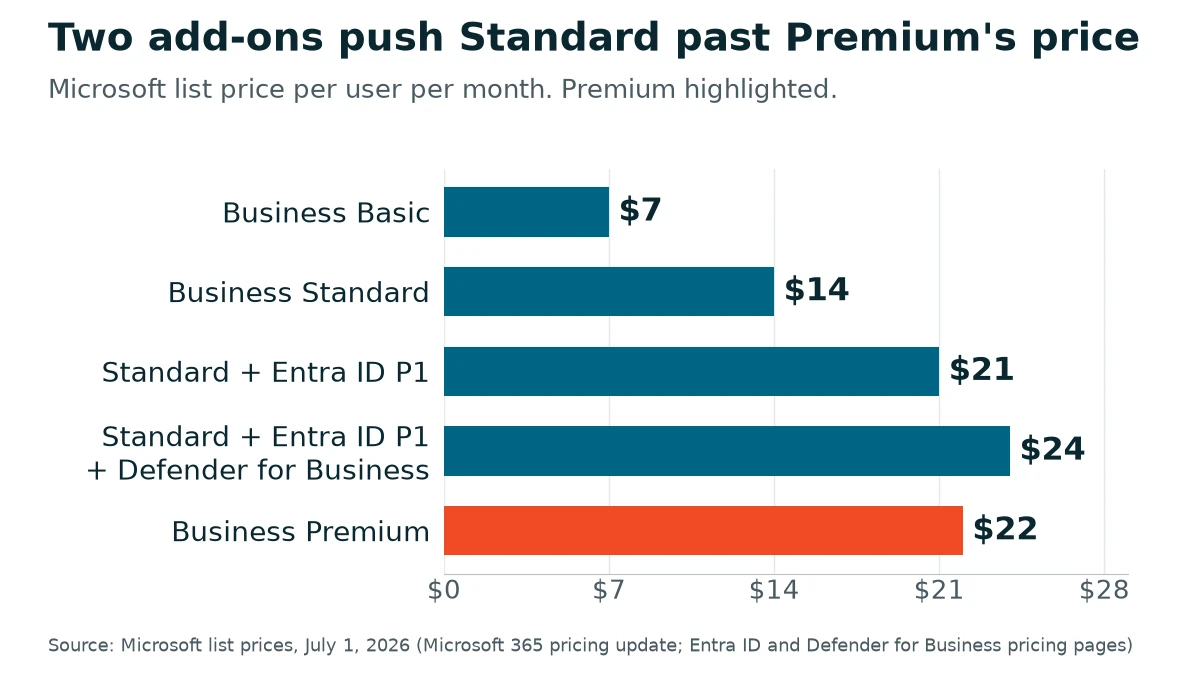
Do the sums. Standard plus Entra ID P1 comes to $21, a dollar under Premium. Add Defender for Business and it’s $24, two dollars over, and that stack still has no Intune, no Defender for Office 365, no data loss prevention, no Message Encryption, and no sensitivity labels. Price is context here. Not the point. A leaner stack, say Standard plus Defender for Business and Defender for Office 365, can come in under Premium, and it still leaves out Conditional Access, Intune, data loss prevention, and encryption. Once you need Conditional Access plus endpoint protection, or Intune, the add-on route usually costs as much as Premium or more.
Can you mix plans? Yes. Microsoft’s Business Premium FAQ confirms you can put part of the company on Premium, with a caveat that the security and management benefits apply to the users licensed for it and not to anyone else. Microsoft recommends licensing everyone. All three Business plans also share one cap of 300 seats per tenant, counted together.
The add-on route does make sense for a single, specific gap. One gap, one add-on. Encrypted email is the usual one. Microsoft’s Purview documentation says Azure Information Protection Plan 1, added to Business Basic or Standard, gives the organization the rights to Message Encryption. Among the clients I work with, insurance brokerages were the first to need encrypted email.

Pick the Plan by What You Have to Protect
Compliance frameworks look different on paper. Underneath, they ask for similar things.
“All of these compliance outlines or frameworks, they’re all kind of based on the same things. So it’s just a matter of which of these plug-and-play components do you need.”
Mike Stoveken, VJNetworks
Read the table again with that in mind and the plan choice gets simpler. A few patterns we work through with clients.
- An accounting or CPA practice holding client tax data. My two picks for every accounting firm are Entra ID and Azure Information Protection. The labeling and encryption side of that now runs through Microsoft Purview Information Protection, and Microsoft still sells Azure Information Protection Plan 1 as a license. Built in or add-on, every accounting firm should have both. Premium carries Entra ID P1, manual sensitivity labels, and Message Encryption, and the Microsoft 365 setup guide for accounting firms covers what to switch on once you have them.
- Insurance agencies sending policy documents and claim details to clients outside the company. Encryption is the requirement that arrives first, so Premium, or AIP Plan 1 on top of Standard if nothing else is needed yet.
- Staff reading mail on personal phones? Protecting company data there without taking over the whole phone needs app protection policies, which means Intune, through Premium or an Intune Plan 1 add-on. Making Conditional Access insist on those protections also takes Entra ID P1.
- A six-person architecture or engineering office with no regulated client data, firm-owned laptops, and email as the main exposure. Standard with security defaults switched on and verified can be a defensible place to start, as long as someone revisits it when the firm takes on a client with contractual security terms.
No plan is a compliance certificate. None. A license unlocks the components, and somebody still has to assemble them and write down what was done.
SharePoint Comes With Every Plan
One decision doesn’t depend on the tier at all. All three plans include SharePoint, and I think companies under-use it.
“Most companies utilize some form of OneDrive when they should be using SharePoint a lot more… OneDrive is a more user-based version of SharePoint, SharePoint is the company-based version of OneDrive. I think they should utilize SharePoint more.”
Mike Stoveken, VJNetworks
Where does licensing come in? Premium’s retention policies and data loss prevention can cover SharePoint sites as a location, so company files kept in SharePoint fall under rules the business sets, instead of living in one person’s OneDrive. If a file server is still in the picture, our comparison of SharePoint and OneDrive versus a file server walks through that move.
The License Is the Easy Part
Paying for Premium switches on less than people expect. Microsoft does turn a few things on by default, including built-in Safe Links and Safe Attachments protection and Defender for Business at the tenant level, and in eligible tenants it creates Microsoft-managed Conditional Access policies in report-only mode that it switches on after at least 30 days unless an admin opts out. The rest is configuration. Conditional Access policies have to be written. Devices have to be enrolled in Intune and onboarded to Defender, labels published, and data loss prevention rules tested before they start blocking mail. Licensing has a catch too. Microsoft expects a license for every user who benefits from these protections. Microsoft is clear that tenant configuration stays with the customer, which is the subject of our piece on what Microsoft secures and what you secure.
Order matters on the way up. A lot. Microsoft says an organization replacing security defaults with Conditional Access has to turn security defaults off, and that Conditional Access policies should be enabled immediately afterward. Build your policies in report-only mode first and check what they would have blocked. Then turn security defaults off and switch the policies on in the same sitting, so there’s no window where MFA isn’t enforced by anything. Sign-in prompts may change. Microsoft also recommends two cloud-only emergency access accounts holding the Global Administrator role, kept for the day every other admin is locked out.
On our managed IT agreements, managing and securing Microsoft 365 is part of the contract rather than a separate project, and my team responds within 15 minutes during business hours when something in the tenant needs attention.
Common Questions Before You Change Plans
Is Business Standard secure enough on its own?
Can part of the team be on Premium and the rest on Standard?
All we need is encrypted email. Do we have to move to Premium?
Does Business Premium protect our servers too?
What would Entra ID P2 add on top of Premium?
We’re on security defaults today. What happens when we switch to Conditional Access?
Talk with our team about which Microsoft 365 plan fits what your business has to protect. No cost, no obligation.