

What a professional services firm pays for managed IT depends less on its profession than on what it already has in place, where its systems run, and whether it holds regulated client data. VJNetworks plans start at $995 a month.
Accounting practices, engineering offices, consultancies, insurance agencies. They get grouped together as “professional services” because they all sell expertise by the hour, and from a pricing point of view the label tells you almost nothing. A twelve-person consultancy and a twelve-person CPA firm can sit next to each other on the same floor and need very different things from an IT provider. Why? Data, mostly.
So I’m not going to give you a profession rate card. There isn’t one, at least not in our pricing. What I can give you is the market range from published data, the handful of things that actually move a firm’s number, and how those things tend to show up in each kind of firm we support through our IT for professional services firms.
One caveat before the numbers. I don’t have benchmark data of my own, and I won’t pretend to. Where a figure appears below, it comes from a named outside source. Where something comes from my own experience, I’ll say so.

The Market Range Before Anyone Sees Your Office
Managed IT pricing is the recurring monthly fee a provider charges to support, secure, and maintain a firm’s computers, user accounts, network, and cloud services. Providers count that work by the person, by the device, or as one fee for the whole environment, and they price whatever your starting point requires on top.
The most useful public look at what providers actually charge comes from Kaseya, a company that sells management software to IT providers. Its 2024 MSP Benchmark Survey Report asked 984 providers, about 70% of them in the Americas, how they price. Kaseya has an interest in the industry it surveys, and the sample is global. Read it as the shape of the market, not a price list for Rockland, Westchester, or Bergen. Still useful.
The single most common per-user band was $50 to $100 a person each month.
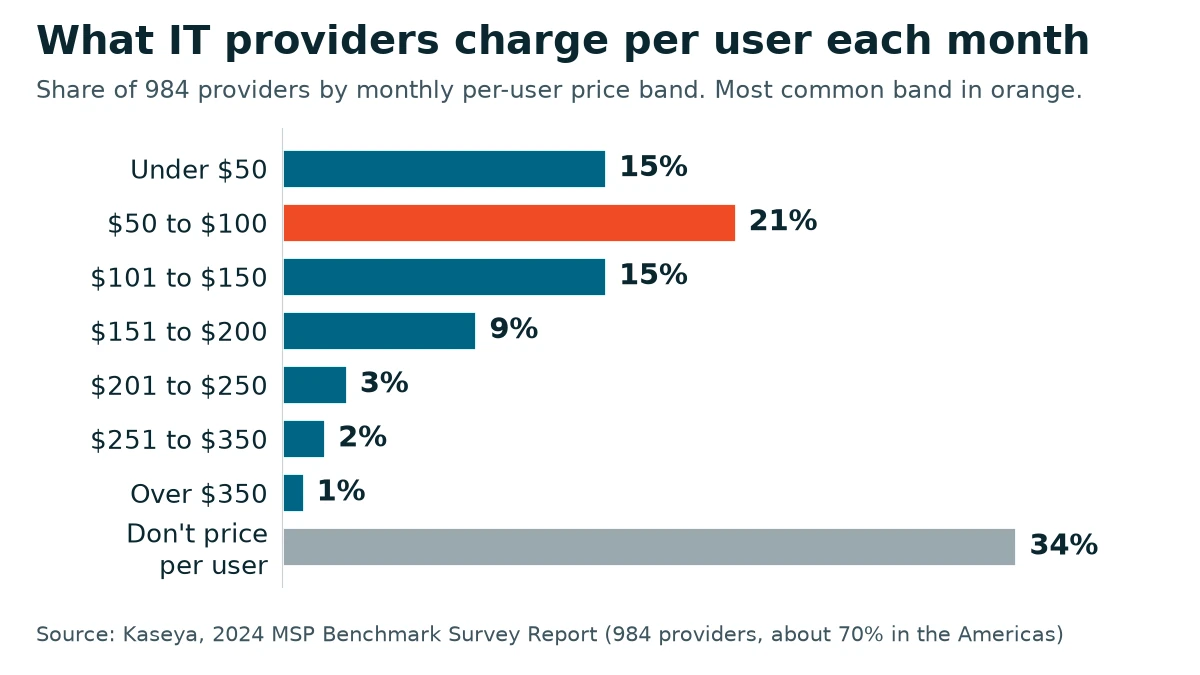
Here are all eight answers to the per-user question, as shares of the 984 respondents. Under $50 a user each month, 15%. From $50 to $100, 21%. From $101 to $150, 15%. From $151 to $200, 9%. From $201 to $250, 3%. From $251 to $350, 2%. Above $350, 1%. And 34% don’t price per user at all.
That last number is the one people skip. A third of the market counts something else, devices, bundles, or a flat fee, which is why two quotes for the same firm can be hard to line up. Among the providers that do bill per user, about three in four charge $150 or less, and only about 6% of the whole sample goes past $200. Our own plans start at $995 a month. Compare totals, not unit prices.
Four Kinds of Firm, Four Different Cost Drivers
The table below is what I’d want a managing partner to see before any number comes up. It shows what usually drives the support cost for each type of firm, and the costs that typically come on top of the support itself.
| Firm type | What usually drives the cost | Typical costs beyond the support itself |
|---|---|---|
| Accounting and CPA practices | Client tax and financial records under the FTC Safeguards Rule, tax software often on an office server, QuickBooks support | Tax software licenses, server hardware, the Microsoft 365 tier that carries the needed controls |
| Architecture and engineering firms | Very large project files, a file server or heavy storage, several design software releases on each machine | Autodesk and Bluebeam subscriptions, CAD workstations, storage that grows with the archive |
| Consulting firms | Mostly laptops and cloud apps, people working from client sites, security terms in client contracts | Laptops, any license upgrade a client contract calls for |
| Insurance agencies | A New York license can bring 23 NYCRR Part 500, encrypted email, the agency management system | Agency management software, the Microsoft 365 tier with encryption and compliance features |
Read down the middle column. Headcount isn’t in it.
Design firms are the clearest example of costs that never touch the support line. Software subscriptions and workstations can outweigh the support itself, and we priced that out line by line in what managed IT costs an architecture or engineering firm. Accounting practices have their own wrinkles around servers, seasonal staff, and the Safeguards Rule, covered in how much a CPA firm should pay for managed IT. This page is the umbrella over both. I’ll stay on what applies across all four. Starting with regulation.
Regulated Client Data Does Cost More
Regulated industries cost more to support than unregulated ones. I’ll say that plainly, and I’m going to stop there, because I can’t honestly put a percentage on the gap. It depends on what the firm already has. I’d be guessing.
What I can show you is where the extra work comes from. The FTC’s guide to its Safeguards Rule names “tax preparation firms” among the financial institutions it covers, and the rule asks for multi-factor authentication for anyone accessing customer information, encryption of that information on your systems and in transit, and a written security program. A firm holding information on fewer than 5,000 consumers is excused from four specific requirements under 16 CFR 314.6, among them the written risk assessment and the written incident response plan. Not from multi-factor authentication. Not from encryption.
Insurance is a different rulebook. The Department of Financial Services’ cybersecurity regulation, 23 NYCRR Part 500, reaches anyone operating under a license issued under New York’s Insurance Law, which generally includes agencies and brokers. A small agency may qualify for a limited exemption, for example by having fewer than 20 employees and independent contractors. That exemption still leaves a cybersecurity program, a risk assessment, oversight of third-party service providers, and multi-factor authentication in place. Smaller list. Still real work.
Insurance agencies were also among the first of our clients to need encrypted email, before most other offices were asking for it.
Here is the part that keeps this from being a scare story. “All of these compliance outlines or frameworks, they’re all kind of based on the same things. So it’s just a matter of which of these plug-and-play components do you need.” The framework names change. The controls mostly don’t. A CPA firm and an insurance agency end up asking for many of the same pieces, and the work behind each piece looks much the same wherever it lands.
Some of the cost isn’t labor at all. Microsoft builds most of its security features into Microsoft 365, but many of them only switch on with the right license, and some need an add-on that sits on top of another license. Microsoft’s July 2026 price update put Business Standard at $14.00 a user each month and left Business Premium at $22.00, and Premium is the tier that adds tools such as Conditional Access, Intune device management, and Defender for Business. For a regulated firm, that $8 a person comes from Microsoft’s license price, not from support labor, so ask any provider how their quote handles it. Check your tier.
Where Your Systems Run Moves the Per-Seat Price
This one surprises people, because it has nothing to do with profession or regulation.
A firm whose people work on local machines, with a file server in the back room, costs one amount per seat to manage. A firm whose desktops all run in an Azure environment through a terminal server costs more. Noticeably more. “That all raises the cost per seat significantly. But also builds disaster recovery right into their system.” You pay more each month, and in return the office can keep working from somewhere else if the building or its hardware has a bad week.
Is that a compliance cost? No. One of the clients we run that way is a construction company with no regulator looking over its shoulder at all. It’s an architecture decision, and any provider who prices it as the cost of being regulated is mixing two different things.
Backup works the same way, by architecture rather than by profession. “It isn’t really a per server cost. It’s really a space cost.” Most offices we support hold a few hundred gigabytes, maybe a terabyte, while one client of ours runs a 20 terabyte server, and backing that up takes a very different strategy from backing up 500 gigabytes. An engineering firm with fifteen years of drawings and a consultancy that lives in SharePoint can have the same headcount and very different backup bills. A storage bill, really.
We don’t back up every workstation as a rule. We keep data off the workstations by design and back up the servers and shared storage where it actually lives, which is a large part of why the backup line follows storage rather than the number of desks.
Your Starting Point, and the Inversion People Don’t Expect
When someone asks what it will cost to get their firm where it should be, I start with what they’re doing now and what’s already in place. The number comes after that. “Cost really comes down to their starting point. What do they have implemented already, what do they need, and also the size.”
I said that about insurance agencies getting their controls up to what a regulator expects. And then the line that tends to get a reaction. “If you’re a one-person agency and you have nothing, it’s probably still going to cost you less than if you’re a 20-person agency and you have most of it already.” Twenty people bring twenty sets of accounts, devices, and habits to bring into line, even when the policies are mostly written. One person with nothing is a small project. Counterintuitive, I know.
Which starting points matter? Whether multi-factor authentication is enforced or merely available. Whether there’s a server, and how old. Whether the Microsoft 365 tenant was set up deliberately. Whether anyone can say who still has access to the client files. Each one is either done or it’s work. Usually some of each.
Some of that work fits inside the monthly fee, while the bigger gap-closing usually gets scoped and quoted as a one-time project, so the monthly number describes the ongoing job rather than the catch-up. Ask any provider which is which.

What the Monthly Fee Covers, and What Sits Outside It
Our pricing guide for Rockland, Westchester, and Bergen businesses covers the general mechanics. For a professional services firm, the scope of our agreements looks like this.
- Unlimited support for everyone in the firm.
- Endpoint security, with monitoring and advice on what it finds.
- Management and security of the platform you run on, which is usually Microsoft 365 and sometimes Google Workspace.
- Your line-of-business software where it matters to the work, whether that’s tax software, a design suite, or an agency management system.
- Network security and maintenance, and repairs.
- Help meeting the compliance goals your clients or regulators set.
- Onboarding and offboarding when people join or leave.
- vCIO strategy and roadmapping, so the next big purchase is planned rather than discovered.
Three things stay out. Hardware, materials, and toner. Software licensing beyond what we manage under contract is separate as well, which is why the table above lists software as an extra.
When something breaks, someone from my team responds within 15 minutes during business hours. That holds for an accounting office in tax season and a consultancy in a slow month alike.
Trimming the Number Without Paying for It Later
Every firm wants a lower number. Fair enough. The trouble is where the cut lands. “When you skip on something somewhere, you’re going to pay more down the line because you didn’t spend as much in the first place.” The usual version is a temporary fix that gets applied again and again because it’s quicker than solving the problem properly. Each visit is cheap. The total isn’t.
Better places to look, in my experience? License tiers people don’t use. Design seats that could drop to a lighter product. Archived projects sitting on expensive storage. A branch office set up as if it were its own company, when one firm with several locations can be run as one environment with the branches hanging off it. Those are real savings. Turning off the controls a regulator asks for isn’t one, because it only moves the cost somewhere less predictable.
Questions Partners Ask When the Number Comes Up
Does a CPA firm pay more than a consultancy the same size?
We’re a New York insurance agency with eight people. Does Part 500 really apply to us?
Is $995 a month enough for a small consulting firm?
Are our tax program, Autodesk seats, or agency software included in the fee?
Why would hosting our desktops in Azure cost more per person?
Do you back up every laptop and desktop in the office?
Does an accounting firm’s monthly fee go up during tax season?
Talk with our team about your firm’s systems, the client data you hold, and what managing it would involve. No cost, no obligation.