

Managed IT for an architecture or engineering firm starts at $995 a month. For anyone working in Revit, the Autodesk subscription on that seat usually costs more than the support, and the workstation belongs on a separate hardware line.
Most pricing guides for this vertical quote a per-user support fee and stop there. That number is real. It is also only part of the story, because a design firm’s technology spend has a different shape from an insurance agency or a CPA office with the same headcount, and the difference sits in two places a support agreement never touches.
The software you design in. The machines it runs on.
There are 916 architectural, engineering, and related offices across Rockland, Westchester, and Bergen, according to the Bureau of Labor Statistics’ 2025 employment count for NAICS 5413, and together they employ about 9,200 people. Roughly ten per office. Architecture practices alone average closer to five, and the Census Bureau’s 2023 County Business Patterns puts about nine in ten of these offices, in all three counties, under 20 employees. Firms that size are what our IT for professional services firms work is built around, and the design firms among them are the ones whose budgets look least like anybody else’s.

Where a Design Firm’s Technology Money Actually Goes
Managed IT, for a design firm, is a flat monthly agreement that covers support, security, monitoring, and upkeep for your computers, network, Microsoft 365 tenant, and file server. It does not include the design software your people license or the hardware they sit at. Those get bought, and budgeted, on their own.
Five lines, then. Here is what each one costs in 2026 at published prices, before anybody negotiates anything.
| Budget line | Who you pay | How it is priced | 2026 reference price |
|---|---|---|---|
| Managed IT support | Your IT provider | Flat monthly, scaled by seats, servers, and sites | From $995 a month; $1,000 to $2,800 for most offices of 10 to 15 people |
| Microsoft 365 | Microsoft | Per user, per month | Business Premium $22.00 on an annual term |
| Design software | Autodesk, Bluebeam, and friends | Per named user, per year | AEC Collection $3,675; Revit $3,005; AutoCAD LT $540; Bluebeam Core $330 |
| Workstations | The hardware maker | One-time purchase per machine | About $3,000 for a Revit-ready tower at current store prices, against about $1,670 for an office desktop with the same processor, memory, and drive |
| Storage and backup | Microsoft, a file server, or both | By capacity | SharePoint overage $0.20 per GB a month; Microsoft 365 Backup $0.15 per GB a month |
Only the first row is what people mean when they say “managed IT.” The other four are where design firms get surprised.
The Seat Costs More Than the Support
Autodesk sells its desktop software as annual subscriptions, one per named user. At list price on Autodesk’s own store, the Architecture, Engineering & Construction Collection runs $3,675 per user per year. Revit alone is $3,005. AutoCAD is $2,095, and AutoCAD LT, the 2D drafting version, is $540.
Divide the Collection by twelve. About $306 a month, for one designer.
Now set that beside the support. At the top of our published band, $2,800 a month for a twelve-person office, support works out to roughly $233 a seat. At the bottom it’s closer to $83. Either way the Collection seat costs more than the support seat, and so does Revit on its own, at about $250 a month. Our own IT budget guide for a 20-person business sets aside $1,500 to $4,000 a year for line-of-business software across the whole company. A design firm spends that on a single designer.
Then there’s Bluebeam, for whoever marks up drawing sets or runs construction administration. Bluebeam’s pricing page lists Basics at $260, Core at $330, and Complete at $440, per user per year, billed annually. Smaller numbers. They land on the same credit card anyway, and they rarely show up in the IT budget.
Giving every designer the full Collection is tempting, and sometimes it’s right. A drafter who spends the whole week in 2D production work rarely needs it, though, and AutoCAD LT at $540 a year is a very different line item.
The software also changes how much support each machine needs, which is the part firms tend to leave out of their own math. Autodesk gives subscribers the current release plus three previous versions, and it is blunt about compatibility. Revit “cannot open a model that was saved by a newer version,” according to Autodesk’s own support article. So a firm with projects that started in different years often keeps several releases installed side by side. Each one needs updates. Each add-in has to match its release. A new hire’s machine has to carry all of them on day one. That is labor, and it’s a big reason specialized software shows up on our list of what moves a quote.
What the Monthly Fee Covers, and the Two Things It Never Has
Our agreement covers unlimited support, endpoint security with monitoring, management of your Microsoft 365 tenant, network security and maintenance, repairs, onboarding and offboarding, help meeting whatever compliance goals your clients hand you, and vCIO strategy and roadmapping. Line-of-business applications are part of it where they matter, and in a design office Revit, AutoCAD, and Bluebeam matter all day. When something breaks, someone from my team responds within 15 minutes during business hours.
Two things stay out. Software licensing beyond what the agreement itself manages, and hardware. We say so up front in our managed IT pricing breakdown for Rockland, Westchester, and Bergen, and it matters more for a design firm than for almost anyone, because those two lines are where your money actually concentrates.
Why keep them out? Partly clarity. A monthly number that absorbs a $3,000 workstation every few years has to be set high enough to cover it, and you pay that average whether anybody gets a new machine that year or not. Partly control. When a designer gets new hardware is a decision about your projects, and it belongs with you rather than inside a billing formula.
Workstations Get Their Own Line
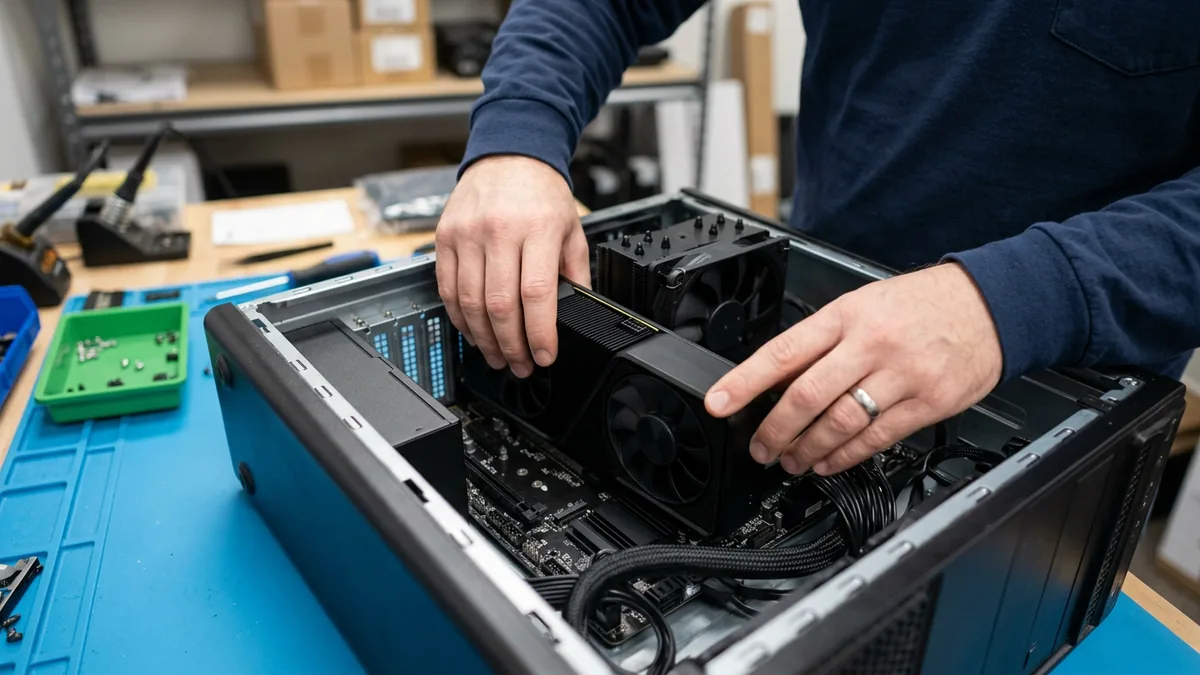
Autodesk publishes three tiers of system requirements for Revit 2027, the current release. The minimum is 16 GB of memory, sized for a model of roughly 300 MB on disk. The top tier asks for 64 GB for models around 1 GB, with a graphics card carrying 8 GB of video memory. The operating system line reads 64-bit Windows 11, and Autodesk recommends the highest single-core clock speed you can buy. That’s a different shopping list from an office desktop.
Here is what that looks like on the manufacturers’ own US stores this week. The first two rows share a processor, 32 GB of memory, and a 1 TB drive. Only the graphics card and the workstation platform built around it differ.
| Machine | Configuration | Store price, September 25, 2026 |
|---|---|---|
| Lenovo ThinkCentre M70t Gen 6 (office desktop) | Intel Core Ultra 7 265, 32 GB, 1 TB, integrated graphics | $1,669 |
| Lenovo ThinkStation P3 Tower Gen 2 | Intel Core Ultra 7 265, 32 GB, 1 TB, NVIDIA RTX 2000 Ada 16 GB | $3,029 |
| HP Z2 Tower G1i | Intel Core Ultra 7 265, 32 GB, 1 TB, NVIDIA RTX 2000 Ada 16 GB | $2,999 on sale (HP lists $6,233 as its suggested price) |
| HP Z2 Tower G1i, heavier build | Intel Core Ultra 9 285K, 32 GB, 1 TB, NVIDIA RTX PRO 4000 Blackwell 24 GB | $4,399 on sale |
| Lenovo ThinkPad P16s Gen 4 (mobile workstation) | Intel Core Ultra 7 255H, 32 GB, 1 TB, NVIDIA RTX PRO 500 Blackwell 6 GB | $3,029 |
Call it about $1,360 for the graphics card and the platform around it. Store prices move every week, and HP’s own suggested price on that Z2 is more than double what its store charges today, so read this as a snapshot. It is not a quote.
Hardware gets its own line for three plain reasons. It’s lumpy, a burst of spending every few years instead of a steady monthly bill. It follows your designers, not your headcount, since the office manager doesn’t need a professional graphics card. And accounting treats it differently. The IRS lets a business without an applicable financial statement deduct items up to $2,500 per invoice or item under its de minimis safe harbor. A Revit-ready tower at around $3,000 sits above that line, and the office desktop in the table sits under it. Your accountant makes that call. Not your IT company.
When we source a workstation for a client, it’s quoted as its own purchase and it belongs to you. The monthly agreement covers keeping it patched, protected, and running once it’s on the desk.
There’s a second clock on older machines. Windows 10 reached end of support on October 14, 2025, and Windows 11 is only supported on hardware that meets Microsoft’s Windows 11 requirements, including TPM 2.0 and a supported processor. For mainstream Intel Core chips, Microsoft’s supported processor list starts at the 8th generation, so an older CAD tower that still renders perfectly well may not qualify. Keeping one of those patched now costs a yearly fee, covered in the questions below.
Storage Is Where Design Firms Outgrow Office Math
Microsoft 365 business plans share one pool of SharePoint storage across the tenant, 1 TB plus 10 GB for every license, according to Microsoft’s SharePoint limits. A twelve-person firm gets about 1.1 TB. For an insurance agency that is years of headroom.
A design firm can fill it with one busy stretch of projects.
Past the quota, Microsoft’s pay-as-you-go rate for SharePoint storage is $0.20 per GB per month, which comes to roughly $205 a month for every extra terabyte. Protecting that same data with Microsoft 365 Backup is listed at $0.15 per GB per month. Neither figure is outrageous by itself. Both scale with your archive instead of your headcount, and an archive only ever grows.
The live models are where the math stops being simple. Autodesk’s article on using cloud-synced services with Revit files asks whether file-based worksharing works on OneDrive, SharePoint, Dropbox, or Google Drive the way it does on an office network, answers no, and lists corruption of the central model and lost work among the risks. Its alternatives are a file server on the local network, Revit Server for firms with more than one office, or Autodesk’s cloud collaboration subscription, now called Forma Design Collaboration and formerly BIM Collaborate Pro. So the choice is a hardware line or a software line.
Not a free line. There isn’t one.
The cloud still wins for closed jobs. Microsoft 365 Archive is priced on that same page at $0.05 per GB per month once you’re past the quota, a quarter of the active rate, and inactive project sites are what it was built for. SharePoint is often the right home for finished work generally, which our comparison of SharePoint and a file server walks through honestly. The live models are the harder question. If your syncs have been getting slower, that is a separate problem with separate fixes, and it’s the subject of our piece on what large BIM and CAD files do to a firm’s network.

A Twelve-Person Firm, Priced Line by Line
Here is a made-up but ordinary firm, built from published prices. Twelve people in one office. Five designers in Revit on the Collection, three drafters on AutoCAD LT, four people in Bluebeam, and everyone on Microsoft 365 Business Premium. Eight CAD towers, replaced on a four-year cycle. The support line uses our full published band for an office this size, because where you land inside it depends on your server, your sites, and your backup, not on the math below.
| Line | Basis | Per month | Per year |
|---|---|---|---|
| Managed IT support | Flat monthly, twelve people, one office | $1,000 to $2,800 | $12,000 to $33,600 |
| Microsoft 365 Business Premium | 12 users at $22.00 | $264 | $3,168 |
| Autodesk AEC Collection | 5 designers at $3,675 a year | $1,531 | $18,375 |
| AutoCAD LT | 3 drafters at $540 a year | $135 | $1,620 |
| Bluebeam Core | 4 seats at $330 a year | $110 | $1,320 |
| CAD workstations | 8 towers at about $3,000, spread over 4 years | $500 | $6,000 |
| Total | Before storage, backup, and internet | $3,540 to $5,340 | $42,483 to $64,083 |
Look at where the money sits. At the bottom of the band, support is about 28% of the monthly total. At the top it’s about 52%. Everything else, roughly $2,540 a month before a single support ticket, is software and hardware. It often lives on a credit card statement and in a capital budget, and neither one gets lined up next to the IT quote.
That’s the point of keeping the lines apart. When a principal asks whether IT is too expensive, the honest answer usually starts with which line they mean.
What Moves a Design Firm Up or Down the Band
Our published pricing names three things that move the number most, which are servers on site, regulated data, and how many locations you run, and it lists specialized software right beside them. A design firm always brings the specialized software. Where it lands inside the $1,000 to $2,800 band depends on the rest of this list.
- A file server in the back room holding live project models. It needs patching, monitoring, and a backup that actually finishes, and that work happens every month.
- Second office? Two sites working on the same models is a network design problem before it is a support problem, and our multi-location IT page covers why one company with two offices prices differently from two companies.
- How many Revit releases you keep installed at once.
- Staff who open multi-gigabyte files from home over the VPN, three days a week.
- Department of Defense work. Engineering firms that handle controlled unclassified information on a defense contract may be in scope for CMMC compliance, and the documentation alone is real labor.
- And the direction people forget exists. One office, no server, and a handful of Revit users can move a firm down the band instead of up.
What Firm Principals Ask When They See the Total
Is the Autodesk subscription included in the monthly IT fee?
We’re a six-person structural engineering office. Does $995 a month cover us?
Should our designers work on mobile workstations instead of towers?
Half our CAD machines still run Windows 10. What is that costing us now?
Can we move our Revit models to SharePoint and retire the file server?
If the budget is tight, what should we cut first?
How long does it take to get a real number from you?
A free IT assessment sorts what your firm spends today into each line, so the next quote you compare is priced the same way as the last one. No obligation.