

Microsoft 365 nonprofit pricing, on Microsoft’s own offers page, is free for Business Basic up to 300 users and $5.50 per user a month for Business Premium, paid yearly. The donated Premium offer ended July 1, 2025.
Until July 2025, Microsoft offered nonprofits a donated version of Business Premium. That offer is gone. The price sheet that replaced it has two sets of numbers, Microsoft’s and TechSoup’s, and they don’t always match. Check both.
Here’s what this guide does for a nonprofit in Rockland, Westchester or Bergen County. It lists what each plan costs today, flags where Microsoft’s figures and TechSoup’s differ, and works out a full year of seats for a 30-person office. Our page on Microsoft 365 and cloud services covers the management side. Prices were read on November 4, 2026. Check the date on your own quote.

Microsoft 365 Nonprofit Pricing by Plan
Microsoft 365 nonprofit pricing is the set of free and reduced per-user rates Microsoft offers to organizations that confirm their eligibility as nonprofits. Business Basic is free for up to 300 users on Microsoft’s page, and the paid plans are priced per user per month on a yearly term, so a renewal date decides when a price change reaches you.
Here’s the sheet, with both channels side by side. The Microsoft column comes from its nonprofit offers page. The TechSoup column comes from its price notice of May 19, 2026 and from its program-changes post, which TechSoup updated after the July 2025 change.
| Plan | Microsoft’s offers page | TechSoup, per license per month |
|---|---|---|
| Microsoft 365 Business Basic | Free, up to 300 users | $1, up to 300 users |
| Microsoft 365 Business Standard | Not listed | $3.50 (was $3 before July 1, 2026) |
| Microsoft 365 Business Premium | $5.50 per user per month, paid yearly | $5.50 above 10 licenses; the first 10 are $1 per license |
| Microsoft 365 E3 | $9.75 per user per month, paid yearly | $9.75 (was $9 before July 1, 2026) |
| Microsoft 365 E5 | $24 per user per month, paid yearly | $24 (was $22.80 before July 1, 2026) |
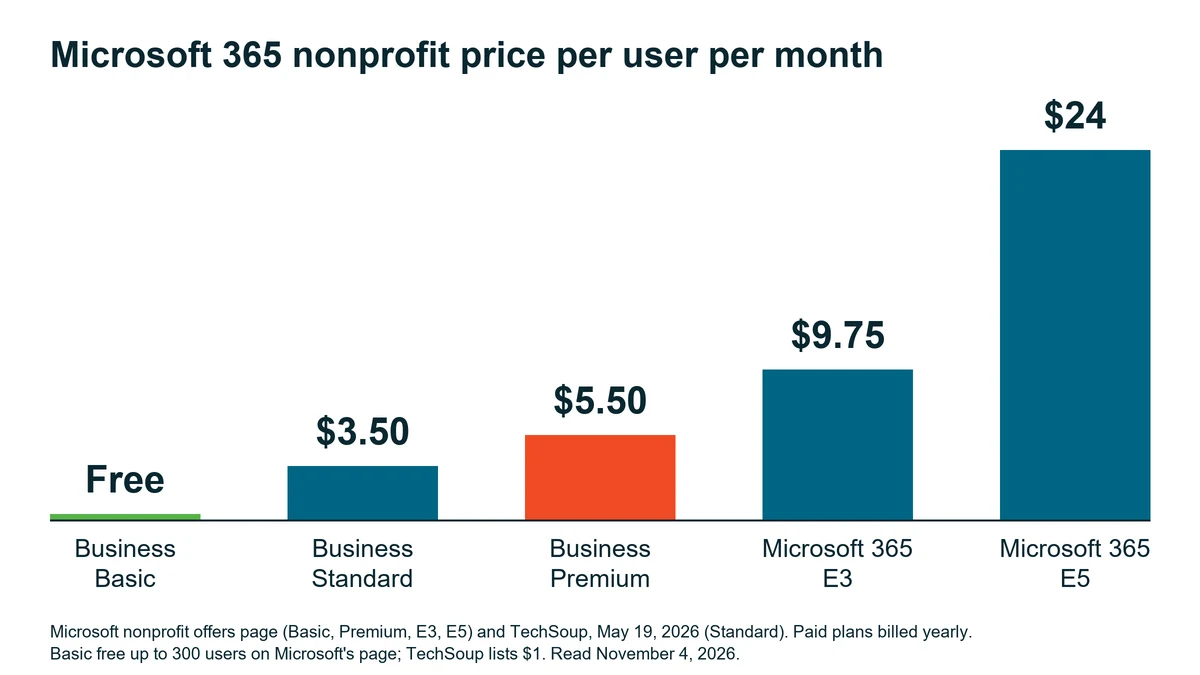
Two channels, two prices for the same plan. Microsoft’s page calls Business Basic free for up to 300 users. TechSoup charges $1 a license per month for it. Premium differs at the low end too. TechSoup sells the first 10 Premium licenses at $1 per license, and its post doesn’t say what period that $1 covers. Ask. Then price the channel you’re actually buying through and get the line item on paper.
TechSoup says the prices in its notice are “based on an annual commitment term and are paid annually.” Why did some of them move? Its notice says commercial pricing would rise on July 1, 2026, with nonprofit pricing adjusted to keep “a fixed discount of 60 to 75 percent off the commercial rates.” Standard, E3 and E5 went up. Basic, Premium and Office 365 E1 show no change. Half moved.
What Ended in July 2025 and What Did Not
TechSoup puts it plainly: “As of July 1, 2025, Microsoft discontinued the donated offers of Microsoft 365 Business Premium and Office 365 E1.” The same note adds that the discounted licenses of both products are still available for nonprofits.
So the donated Premium offer is gone. Premium isn’t. It’s the $5.50 line in the table.
- Business Basic is still free for up to 300 users on Microsoft’s page.
- Office 365 E1, the other donated offer that ended, appears in TechSoup’s May 2026 notice at $2.50 per license per month, unchanged on July 1, 2026.
- For licenses a nonprofit already holds, TechSoup says the July 2026 price changes take effect at the next subscription term renewal on or after July 1, 2026.
- Premium’s $5.50 did not change.
One cap shapes the whole sheet. Microsoft’s plan options service description says the Business plans are designed for organizations with up to 300 users, and the limit counts across the whole Business family, so its own example tenant with 250 Business Premium seats can add only 50 more Business seats of any kind. Above 300 users, Microsoft says to consider its enterprise plans. That matters for mixing.
What a 30-Person Nonprofit Pays in a Year
Picture a 30-person nonprofit with everyone on one plan. It’s hypothetical. The figures are plain multiplication on the listed prices, using Microsoft’s page for Basic, Premium and E3 and TechSoup’s notice for Standard. Seats, times the monthly price, times twelve. Arithmetic, not a quote.
| Plan | 30 seats per month | 30 seats per year |
|---|---|---|
| Business Basic | $0 | $0 |
| Business Standard | $105 | $1,260 |
| Business Premium | $165 | $1,980 |
| Microsoft 365 E3 | $292.50 | $3,510 |
Through TechSoup the Basic row isn’t zero. At $1 a license per month, 30 seats come to $360 a year. Standard to Premium is a $720 gap a year for those 30 seats, or $2 per seat per month. That gap is the decision.
So what does the money buy? Business Basic comes with the web and mobile versions of the Microsoft 365 apps and no desktop apps, according to Microsoft’s offers page and its service description, while Standard adds the desktop apps. Premium has them too, plus the security layer Microsoft’s Business Premium overview describes as “advanced protection against phishing, ransomware, and data loss,” along with management of the Windows, Mac, iOS and Android devices that connect to your data.

Not every security tool is in the box. Microsoft’s offers page sells two add-ons for Business Premium at nonprofit prices, the Defender Suite and the Purview Suite, at $4 per user per month each or $6 for the pair, paid yearly, which is worth knowing before a quote lands on your desk.
Who needs what? That comes down to each person’s job. Our Business Premium vs Standard comparison walks through the security gap line by line. For the commercial prices these nonprofit rates are cut from, see what Microsoft 365 costs per user in 2026.
Can you mix? Within limits. Microsoft lets a single account hold Enterprise, Business and standalone plans at the same time, so a tenant could run Basic for people who work in the browser and Premium for the people who handle the money. Two catches. All Business seats share one 300-license ceiling. And whether your nonprofit’s terms allow a given mix is for Microsoft, or whoever sells you the licenses, to answer. Get that answer first.
Where Nonprofits Get Their Licensing
In our experience, nonprofits tend to get their licensing through TechSoup, a big nonprofit technology distributor. Not the only one, though. Microsoft’s Partner Center lists Microsoft 365 E3 and E5 Nonprofit offers in its Cloud Solution Provider catalog, and its offers page points nonprofits to those same partners for discounted Windows 11 Pro licenses beyond the grant.
Whichever channel you pick, eligibility comes first. Microsoft asks each organization to “confirm your organization’s eligibility to access all Microsoft nonprofit offers.” TechSoup has its own eligibility and utilization requirements. Do that part first.
Nonprofits vary a lot in how they work, in our experience, so this guide assumes no shared software stack beyond Microsoft 365 itself.
One habit is worth having, whoever manages your tenant. Make the renewal invoice show which price each seat follows, and ask before the renewal, because TechSoup ties its price changes to the renewal date.
Renewal Dates and Annual Commitments
Microsoft lists Premium, E3 and E5 as paid yearly and TechSoup’s prices assume an annual commitment, so the date on your renewal notice matters more than the date on any price announcement. Mark it.
TechSoup’s own example makes it concrete. An annual subscription started on June 15, 2026 keeps the old price until its renewal on June 16, 2027, while a monthly subscription picked up the new price on July 16, 2026. Same increase, eleven months apart. Check the renewal date on every subscription before you set a budget.
Before You Renew a Single Seat
Is anything in Microsoft 365 still free for a nonprofit?
How much is Business Premium for a nonprofit now?
Why did our Standard renewal quote go up?
Do we have to buy through TechSoup?
Can volunteers sit on Basic while staff use Premium?
Can we pay month to month instead?
Next Steps
Talk with our team about your nonprofit’s Microsoft 365 licensing. No cost, no obligation.