

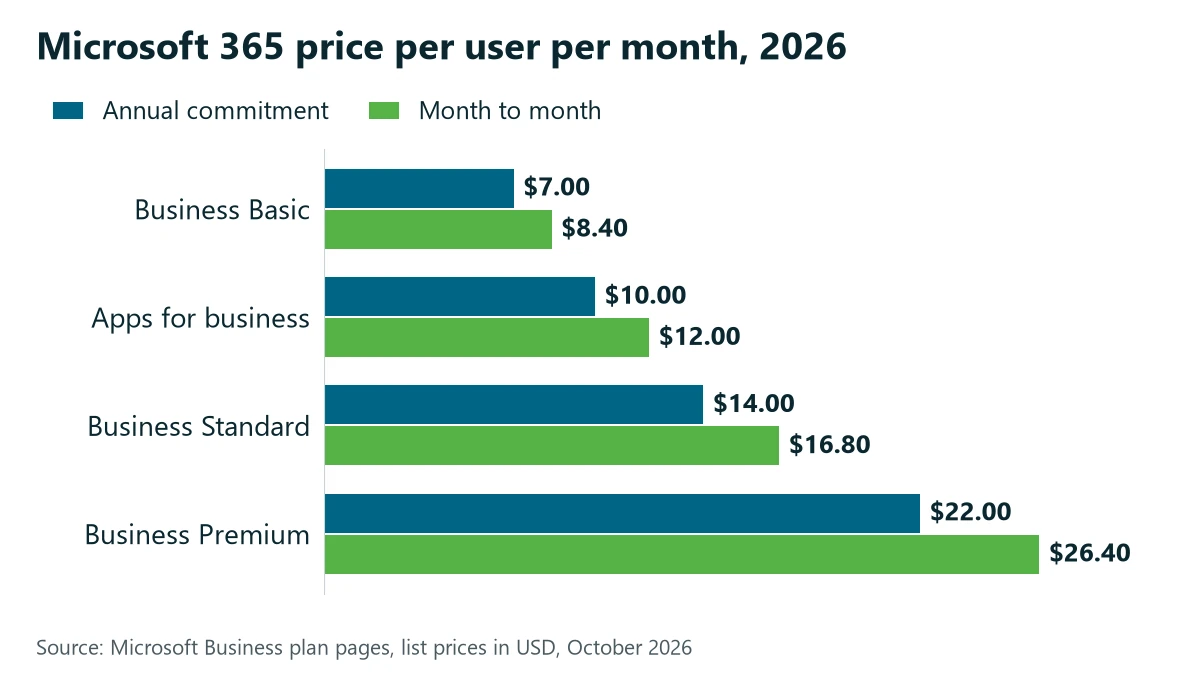
Microsoft 365 costs $7 to $22 per user per month on an annual commitment in 2026, from Business Basic at $7 to Business Premium at $22, and paying month to month adds 20% to every seat.
Those are Microsoft’s own list prices for its Business plans, which are built for organizations of up to 300 users. Add-ons stack on top. What actually lands on an invoice depends on three choices you make for each person. The plan. The commitment term. Whatever gets bolted on later.
I hear this question in two versions. A new business wants one number for the budget. A business that has run Microsoft 365 for years wants to know why its number doesn’t match the website. Both answers start with the same table. Our page on Microsoft 365 management and cloud services covers how my team sets up and runs the platform, and this piece stays on the per-seat bill.
One thing before the numbers. At VJNetworks, Microsoft licenses are billed per user on their own line, separate from managed IT, which starts at $995 a month. Everything below is the license alone. Nonprofits have their own Microsoft pricing, which we cover on our IT support for nonprofits page.
What Each Microsoft 365 Plan Costs Per User in 2026
Microsoft changed several commercial prices on July 1, 2026, according to its 2026 pricing and packaging update. Business Basic went from $6 to $7 per user per month. Business Standard went from $12.50 to $14, and Apps for business went from $8.25 to $10. Business Premium stayed at $22.
Same plans. Higher floor.
| Plan | Annual commitment | Month to month | What sets it apart |
|---|---|---|---|
| Business Basic | $7.00 | $8.40 | Web and mobile Office apps, business email, Teams, and 1 TB of OneDrive |
| Apps for business | $10.00 | $12.00 | Desktop Word, Excel, PowerPoint, and Outlook with 1 TB of OneDrive, but no business email or Teams |
| Business Standard | $14.00 | $16.80 | Everything in Basic, plus the desktop apps |
| Business Premium | $22.00 | $26.40 | Everything in Standard, plus Entra ID P1, Intune, Defender for Business, and Purview Information Protection |
Prices are per user per month in US dollars, as listed on Microsoft’s Business plan pages in October 2026. Microsoft also sells each plan without Teams, at $5.40, $10.79, and $18.79 on annual terms. If your people meet and chat in Teams, that cheaper line isn’t really cheaper, because Teams then has to come from somewhere else. Check before you switch.
Put the two billing columns side by side and the pattern is plain. The monthly premium is the same 20% on every plan, so it costs the most real dollars on the plan carrying the most security.
Existing customers don’t feel the July change right away. Microsoft’s notice says existing customers “remain on current pricing until renewal,” so a business that renewed in May keeps the old Standard rate until next May. Then it moves. If your renewal falls in the next few months, budget the new number now. Don’t wait for the invoice.
Annual Commitment or Month to Month
Microsoft sells the same seat three ways. The price follows the commitment. A monthly commitment paid monthly, which you can cancel at any time. An annual commitment paid monthly. Or an annual commitment paid for the whole year upfront.
On Business Premium, one person costs $264 a year on an annual term and $316.80 month to month, a difference of $52.80 per person per year for the right to walk away.
Is that flexibility worth it? Sometimes. A seat for a summer intern, or a contractor attached to one project, may only exist for a few months, and Microsoft’s own FAQ says annual subscriptions paid monthly “may incur some penalties if canceled early,” while annual subscriptions paid upfront get no refund if canceled before the term ends. Both annual options give you a seven-day window after purchase for a prorated refund. After that the year is the year.
For a permanent employee, annual wins. Every time.
Why the Cheapest Plan Is Rarely the Cheapest Seat
Owners usually start at Basic and work up. Fair enough. The trouble is that the jump between plans isn’t only about desktop apps, and the cheaper plans quietly leave out the security features many businesses end up needing anyway. When an owner asks me why the plans differ so much, my answer is some version of this.
“They build everything into 365. If you need to meet certain compliance frameworks, you have to purchase the right licence that gives you access to those features. Some are included in every licence, but a lot are tied to specific licences, and sometimes you need an add-on licence that’s made to go along with another licence.”
Business Premium is where most of those features live. Microsoft lists Microsoft Entra ID P1 (which carries Conditional Access, the rules about who can sign in from where), Intune for managing devices, Microsoft Defender for Business, and Microsoft Purview Information Protection and Data Loss Prevention. You could buy Standard at $14 and add a standalone Entra ID P1 license at $7, which comes to $21. That’s a dollar under Premium, without the device management or the endpoint protection. Rarely the better buy.
The endpoint piece matters more than people expect.
“You definitely want EDR [endpoint detection and response] on all your workstations and servers. If you don’t have something like that, you’re just asking for it, really.”
Premium already has it. Defender for Business includes endpoint detection and response, and Microsoft sells it inside Premium or on its own at $3 per user per month. Servers are a separate matter. Microsoft offers an add-on for protecting Windows and Linux servers, so a business with a server in the closet should price that too.
Compliance works the same way. My view is that the frameworks differ in name far more than in substance. “So they can call it whatever they want, but it’s all the same kind of practices and technologies.” Which framework applies to you is a separate question. Whether your license includes the technology is a price question, and it is decided per user. Seat by seat. For accounting firms in particular, I’d want identity protection in Microsoft Entra ID and information protection in Microsoft Purview in place, whether the plan includes them or they come as an add-on. Some of you will remember the older Azure Information Protection name; Microsoft now sells and documents that capability under Purview. We go further into the firm-specific settings in our guide to Microsoft 365 for accounting firms.
Add-Ons That Change the Per-User Number
The base plan is the start of the bill. Not the end.
“As time goes on and attack surfaces increase and attacks get more sophisticated, more things kind of fall under that mandatory category.”
Here is what the common add-ons cost per user, all on annual terms at Microsoft’s list price. Entra ID prices come from Microsoft’s July 2026 update, and the Business Premium suites from its security add-on pricing for small and midsize businesses.
| Add-on | Per user / month | Requires | What it adds |
|---|---|---|---|
| Microsoft Entra ID P1 | $7.00 | Any plan without it | Conditional Access sign-in rules |
| Microsoft Entra ID P2 | $10.00 | Any plan | P1 plus risk-based sign-in policies and Privileged Identity Management |
| Defender for Business | $3.00 | Plans below Premium | Endpoint protection with detection and response |
| Defender Suite | $10.00 | Business Premium | Detection and response across identities, endpoints, apps, and email |
| Purview Suite | $10.00 | Business Premium | Wider data loss prevention, retention labeling, insider-risk tools |
| Defender and Purview Suites | $15.00 | Business Premium | Both suites together |
Take encrypted email. It’s the clearest example of a license that rides on another license. Among our clients, the insurance brokerages were the first ones who needed it. Microsoft Purview Message Encryption is part of Business Premium. On Basic or Standard, Microsoft’s message encryption FAQ says you can add a license it still lists as Azure Information Protection Plan 1, and that “each user benefiting from Microsoft Purview Message Encryption needs a license.” Per user, again. Not per company.
Backup breaks the pattern. Microsoft 365 Backup isn’t priced per user at all; Microsoft lists it at $0.15 per GB per month of protected content, so it grows with the data you keep rather than your headcount.

The “With Copilot” Price on Microsoft’s Page
Go to Microsoft’s plan pages today and the first prices you see are the Copilot bundles. Business Standard with Copilot is $23.50 per user per month. Business Premium with Copilot is $32. Neither is the base price. The plans without Copilot are $14 and $22, further down the same page. Keep scrolling.
Build a budget from the first number on the page and you’ve added $9.50 or $10 per person for a product you may not have chosen. Bought separately, Microsoft 365 Copilot Business is $21 per user per month, with a promotional $18 running through December 31, 2026, so for someone who does want it the bundle is the better deal. Whether you want it is another conversation, and we cover it in what Microsoft 365 Copilot does and costs for a small business.
Storage Comes With the Seat
Every Business plan includes 1 TB of OneDrive storage per user. Plenty, for most people. Microsoft’s comparison now lists a 100 GB primary mailbox on Basic, Standard, and Premium, after the extra 50 GB announced in its 2026 packaging update. Premium carries a much larger email archive than the other two.
SharePoint is pooled. Microsoft’s SharePoint limits give each tenant 1 TB plus 10 GB per license purchased, so 20 licenses come to about 1.2 TB of SharePoint storage across the tenant, shared by everyone. Microsoft warns that a tenant running above its limit risks being put into read-only mode until usage drops or more capacity is bought.
I’d still steer most of a company’s files there.
“Most companies utilize some form of OneDrive when they should be using SharePoint a lot more… OneDrive is a more user-based version of SharePoint, SharePoint is the company-based version of OneDrive. I think they should utilize SharePoint more.”
Company files in a personal OneDrive leave with the person. Company files in SharePoint stay with the company.
Where E3 and E5 Fit
Rarely. Not at our clients’ size. Microsoft’s Business plans top out at 300 licenses across the whole family combined. Above that, or for features only the enterprise suites carry, Microsoft 365 E3 runs $39 per user per month and E5 runs $60 after the July update, with Office 365 E3 at $26. For an office of 5 to 60 people, the Business plans and the add-ons above cover nearly every case I see.
What the License Doesn’t Cover
A license buys the features. It doesn’t switch them on. Microsoft secures its platform, and configuring your tenant stays your job, which is the whole argument of our piece on who is responsible for security in Microsoft 365. Conditional Access that nobody ever configured doesn’t stop a single risky sign-in, whatever the license cost.
For our managed IT clients, managing and securing Microsoft 365 is part of the agreement. The licenses sit on their own line. A move onto Microsoft 365 from another email system is a separate, one-time project, which we break down in what a Microsoft 365 migration costs a small business. Hardware stays outside the agreement too.
And the renewal date belongs on the calendar. We look at who has which license, who left, and what the next renewal will cost as part of vCIO strategy and roadmapping, because a license nobody uses still renews at full price.

Questions Owners Ask About the Bill
Did our Microsoft 365 bill go up this year, or will it?
Can different people be on different plans?
Do we pay extra for multifactor authentication?
Is month to month ever the smarter buy?
Why doesn’t our quote match the price on Microsoft’s website?
How does VJNetworks bill for Microsoft 365?
Talk with our team about your Microsoft 365 plans, your add-ons, and what your next renewal will cost. No cost, no obligation.