

Generative AI can now write phishing emails with clean grammar and correct spelling, so the old warning signs stopped working. What still catches an AI phishing email is checking what it asks for, then verifying through a second channel.
For years, the standard advice was to read a suspicious email slowly and look for mistakes. A misspelled “invoice.” A sentence that reads like a bad translation. A capital letter in the wrong place.
Those mistakes were real tells, and two government agencies have now said in writing that generative AI removes them. That leaves the request itself as the part worth checking. Phishing is one part of VJNetworks’ cybersecurity work, and the rest of this piece sticks to what the published evidence says about it.

What Changed, According to the People Tracking It
This part doesn’t come from a vendor selling a filter. The UK’s National Cyber Security Centre published its assessment of AI and the cyber threat in January 2024. Generative AI, it wrote, “can already be used to enable convincing interaction with victims, including the creation of lure documents, without the translation, spelling and grammatical mistakes that often reveal phishing.”
The same assessment looked ahead to 2025. It said generative AI and large language models would “make it difficult for everyone, regardless of their level of cyber security understanding, to assess whether an email or password reset request is genuine.”
The FBI followed in December 2024 and was specific about which signal disappears. “These tools assist with content creation and can correct for human errors that might otherwise serve as warning signs of fraud,” its fraud alert reads. It names translation too, saying criminals use generative AI tools “to limit grammatical or spelling errors for foreign criminal actors targeting US victims.”
Neither warning is about a tool that might arrive someday. The NCSC wrote “can already be used.” The FBI was describing what criminals do now.
What the Numbers Say About AI Phishing Emails, and What They Can’t
No public source counts AI-written phishing emails directly. The big reports measure phishing and business email compromise overall. Starting with 2025, the FBI’s annual report also counts complaints that mention AI.
Verizon’s 2026 Data Breach Investigations Report, its 19th edition, covers more than 31,000 security incidents, more than 22,000 of them confirmed breaches, at organizations in 145 countries. The human element was present in 62% of breaches, up from 60% the year before. Social Engineering was the third most common breach pattern at 16% of breaches, and phishing as a way in held at 16%, the same as the previous year. On AI, Verizon says threat actors are “increasingly relying on GenAI to assist them with various stages of their attacks,” from choosing targets to developing malware, “to make their efforts more effective and efficient.”
Its tone is calm. “Their speed may be increasing, their scale might be a concern, but those are all challenges defenders have been facing for a long time,” the authors write.
| Source | What it measured | The number |
|---|---|---|
| FBI IC3, 2025 Internet Crime Report | Complaints whose details mention AI (first year captured) | 22,364 complaints, $893.3 million in losses |
| FBI IC3, same report | Business email compromise losses in complaints involving AI | Over $30 million in 2025 |
| APWG, Q2 2026 Phishing Activity Trends Report | Phishing attacks, first to second quarter of 2026 | Up 10.1%, to 1,069,681 |
| Verizon, 2026 Data Breach Investigations Report | Breaches involving the human element | 62%, up from 60% |
The Anti-Phishing Working Group counts volume. Its Q2 2026 report, published in August, logged 1,069,681 phishing attacks in the quarter, up 10.1% from the first quarter, and 425,808 in June alone, the highest monthly total since April 2023. Two more figures in it come from member companies rather than from APWG’s own count. Crane Authentication found smishing, phishing by text message, up 40% from the first quarter to the second, and Fortra found wire-transfer business email compromise attacks up 88%, with the average amount requested up 45% to $61,732.
The FBI’s 2025 Internet Crime Report has the clearest AI numbers. It logged 22,364 complaints whose details mention AI, with $893.3 million in reported losses, and 2025 is the first year its tables capture that figure at all. Business email compromise losses were $2.95 billion in 2023, $2.77 billion in 2024 and $3.05 billion in 2025, the highest of the three. Businesses reported more than $30 million of the 2025 losses in BEC scams involving AI.
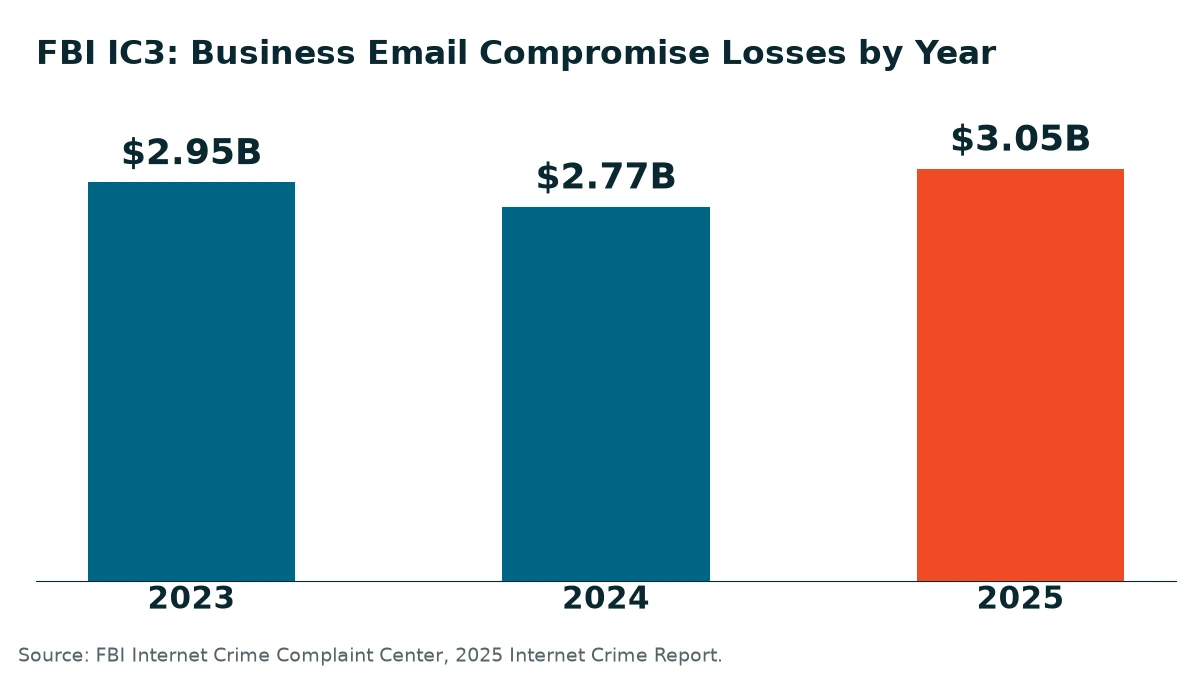
That timing doesn’t prove AI drove the increase. The report itself notes that “There are multiple BEC tactics, and not all are AI-enabled,” and thirty million dollars is about 1% of the BEC total. It does describe how AI fits the scam, though: “Chat generators can quickly create official-sounding emails mimicking a company’s CEO or other officials.” Writing about investment fraud, it adds that “many victims do not realize the extent AI may be involved in scams.”
What a Convincing AI Phishing Email Looks Like Now
Set the writing aside and look at what the email asks for. The NCSC’s phishing guidance describes the usual goals as installing malware or tricking people “into revealing sensitive information (such as passwords), or transferring money.” Business email compromise is the money version. APWG describes it as a threat actor impersonating “an employee, vendor or other trusted party” to “trick an employee into sending money, privileged information, or some other asset.”
Business Email Compromise 101 walks through how the classic version plays out. What AI changes is the delivery. The demand stays the same.
Here’s a hypothetical, built from that pattern rather than from any client. A message reaches the bookkeeper at a 12-person accounting office, apparently from the managing partner, who is traveling that week. The names and the tone are right, and the ask is narrow, to update a vendor’s direct-deposit details before Friday’s payment run because the vendor’s bank supposedly changed. Read sentence by sentence, nothing in it stands out, so the request is the only thing to flag.
So judge the request. Does it change where money goes, or ask for a password? Does it break how your business normally handles that task? The NCSC asks staff to know “the normal ways of working for key tasks (such as how payments are made)” for exactly this reason, so they’re “better equipped to recognise unusual requests.”
What Still Catches AI Phishing Emails
The same NCSC guidance starts from a blunt premise. “Some phishing attacks will always get through,” it says, so it spreads defences across several layers instead of relying on staff to spot every email. Three of its measures apply directly to AI-written email.
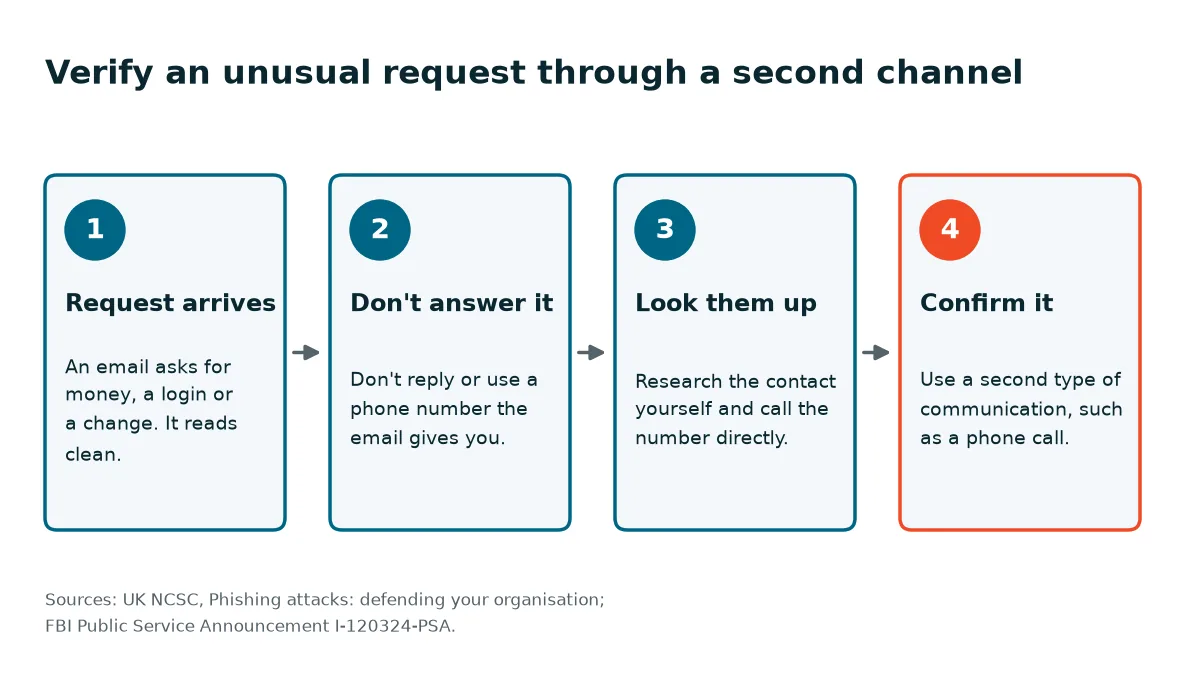
Verify important requests through a second channel. The NCSC asks that “all important email requests are verified using a second type of communication (such as SMS message, a phone call, logging into an account, or confirmation by post or in-person).” Don’t reply to the email, and don’t use a phone number it gives you. The FBI’s alert gives the phone version of the same advice: hang up, research the contact yourself, “and call the phone number directly.”
Stop forgeries of your own domain. The NCSC’s first layer includes making your domains harder to spoof “by employing the anti-spoofing controls: DMARC, SPF and DKIM.” These are DNS records that let receiving mail servers check whether a message using your domain really came from you, and our SPF, DKIM, and DMARC guide covers the setup. They protect your exact domain only, so a lookalike domain one letter off isn’t covered, and neither is mail sent from a real mailbox that someone has taken over.
Limit what one click can reach. With multi-factor authentication, the NCSC notes, “an attacker cannot access an account using just a stolen password.” It adds that “good end point defences can stop malware installing, even if the email is clicked.”
| What used to give phishing away | What to rely on now |
|---|---|
| Spelling and grammar mistakes | What the email asks for, judged against how your business normally works |
| Awkward or machine-translated phrasing | A second channel, using a contact you already had on file |
| Expecting staff to catch every phishing email | Layers behind them: DMARC on your own domain, MFA and endpoint protection |
Why Training Sits at Step Five, Not Step One
In our IT roadmap for a 20-person business, Mike Stoveken, VJNetworks’ vice president, sets out five security steps in the order he recommends. First comes a security baseline, then endpoint security, then strong passwords and MFA on internet-facing accounts, then locked-down admin accounts with a break-glass emergency account. Security awareness training with phishing simulations comes fifth, to train staff so they stop falling for phishing, even though it’s the only one of the five that names phishing at all.
The NCSC makes a related point in its own guidance. “No training package, including phishing simulations, can teach users to spot every phishing attempt,” it says, and it calls training “the layer that is often over-emphasised in phishing defences.” Its MFA and endpoint advice above lines up with steps two and three of Mike’s order.
None of that says to skip training. The same guidance says training “will help your users spot some phishing emails,” and its caution is about method. It warns that punishing people for clicking on emails you’ve sent “starts to resemble entrapment,” says to check with HR before running simulations, and suggests counting how many people reported a phishing email, not only how many clicked.
Common Questions
Can bad grammar still give away an AI-written phishing email?
What does a convincing AI phishing email actually ask for?
Why do some AI-written phishing emails still get past email filters?
Does antivirus catch AI-generated phishing?
If the writing looks clean, what should an employee check instead?
Is phishing-simulation training still worth running if the emails look perfect?
How common are AI-written phishing emails right now?
Talk with our team about where phishing simulations and the rest of your security controls fit for your business. No cost, no obligation.