

Low-cost IT support services can get pricey by year two. Problems patched with a temporary fix come back, computers get replaced more often, and work skipped the first time still has to be paid for later.
Cheap is cheap, we’ll give it that. But the later bill can show up in pieces, a repair call one month, a replacement order a few months on, and staff time lost in between. Spread out like that, it doesn’t arrive as one number you can hold up against the cheap quote.
Our managed IT services cover small businesses across Rockland, Westchester and Bergen. Mike Stoveken described this pattern on a content call about what cheap IT actually costs, so his words run through the guide, alongside pages from Microsoft, NIST and Atlassian that we read on November 5, 2026.

What Low-Cost IT Support Services Actually Leave Out
Low-cost IT support services are arrangements bought mainly on the lowest monthly or hourly price. In the pattern Mike describes, that low number comes from cutting corners, less time on each problem, less spent on equipment, and no digging into why something broke. The corner doesn’t disappear. It turns up later, on a different invoice.
Mike put it in one line. “Pennywise and dollar foolish. You put in your time and effort as little as possible ’cause you value IT very little, and if you keep having the same IT problems, you keep having to replace equipment.”
No villain in that. He wasn’t describing one company, just a rut that businesses get into before they ever call us, and the mechanism fits in a sentence. “They just put in a temporary fix, and they just keep putting in a temporary fix, ’cause it’s less time intensive, it’s cheaper to do it that way.”
How a Temporary Fix Becomes a Year-Two Bill
A workaround isn’t automatically wrong. Atlassian, which sells IT service management software, describes problem management as finding root causes and “implementing long-term fixes or workarounds,” so a stopgap can be part of doing the job properly. The trouble in Mike’s account is the repeat. Same fix, same problem, again and again.
Atlassian also says the practice “frees teams from constant firefighting.” Firefighting is a fair word for an office with a temporary-fix habit. The table follows three kinds of skipped work from year one into year two. The first two rows come from Mike’s account, and the third comes from NIST.
| What was skipped | What year one looks like | What year two looks like |
|---|---|---|
| The root-cause fix | The ticket closes and the printer works again. | The same problem comes back, and the repair gets paid for again in money or staff time. |
| Spending on equipment | A cheaper machine goes in, or an old one stays. | Computers get replaced more often. |
| Patching | Nothing visibly breaks. | Missed patches pile up, and so does the risk patching exists to reduce. |
Row three is where NIST comes in. Its Guide to Enterprise Patch Management Planning, published in April 2022, frames patching as part of “preventive maintenance” and “a cost of doing business.” It says that maintenance “helps prevent compromises, data breaches, operational disruptions, and other adverse events.” NIST also notes a frequent divide between business owners and technology staff over the value of patching. A cheap arrangement can save money on paper right there.
Mike’s version is plainer. “When you skip on something somewhere, you’re going to pay more down the line because you didn’t spend as much in the first place. Whether you have to replace computers more often, or you have to pay someone to fix the exact same problem over and over again because they didn’t put in a real solution.”
A Year-Two Example With Real Price Tags
Equipment is where Mike’s last line lands, and Windows 10 is a tidy example because Microsoft publishes the pricing rule. Support for Windows 10 ended on October 14, 2025. After that date, Microsoft offers Windows 10 security updates through its paid Extended Security Updates (ESU) program, which it describes as an annual subscription. For organizations buying through Volume Licensing, its Learn page on Extended Security Updates for Windows 10 lists $61 per device for year one and says “The price doubles every consecutive year, for a maximum of three years.”
Microsoft prints only that year-one figure. The $122 and $244 below are its doubling rule applied, not separate Microsoft quotes. Timing matters too. Microsoft’s lifecycle FAQ puts the end of Windows 10 ESU year one at October 13, 2026, so year two is the one running now. And ESUs are cumulative. Buy in year two, Microsoft says, and “you have to pay for Year One too.”
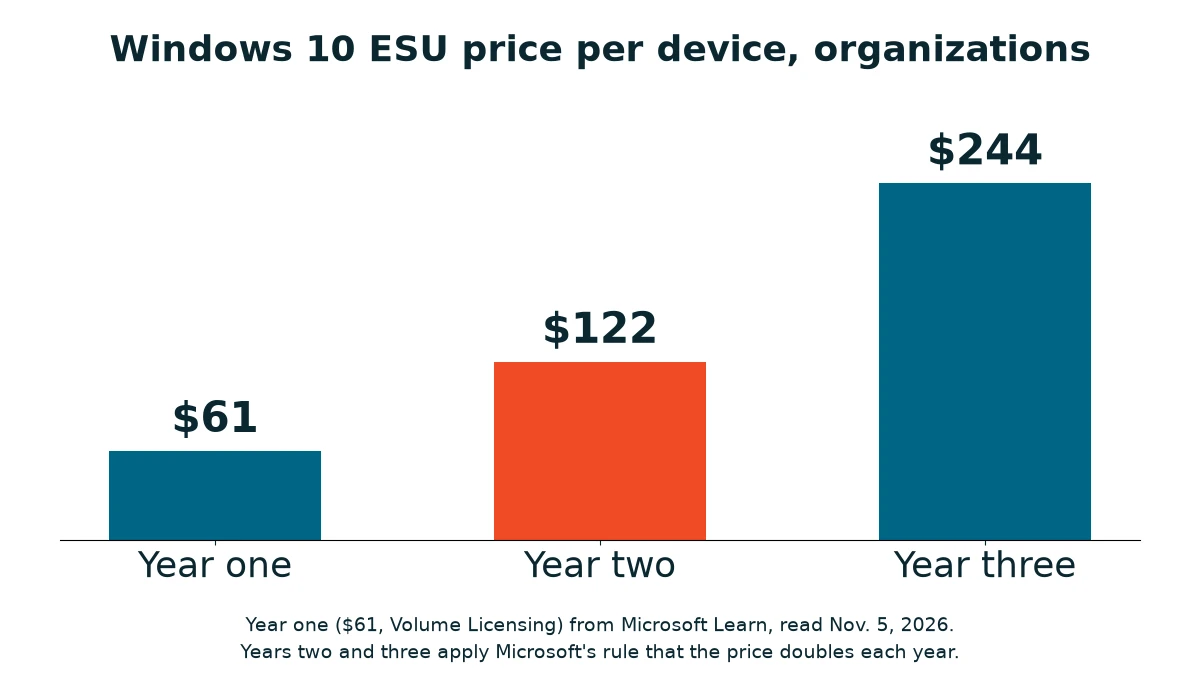
Take a 12-person office that bought low-cost machines and left all 12 on Windows 10. Hypothetical, obviously. Each figure below is Microsoft’s $61 doubled per year and multiplied by twelve, so it’s arithmetic and not a quote.
| Year | Per device | 12 devices |
|---|---|---|
| Year one | $61 | $732 |
| Year two | $122 | $1,464 |
| Year three | $244 | $2,928 |
Enrolled from the start, that’s $5,124 over three years. An office signing up now, in year two, also pays for year one. That’s $183 a device, or $2,196 for twelve. Year three is still ahead. Either way, the office still has the same twelve computers. ESU adds critical and important security updates, and Microsoft says it doesn’t include new features or general technical support.
So why not upgrade? Microsoft’s Windows 11 requirements include a 1 GHz or faster processor with two or more cores on a compatible 64-bit processor, 4 GB of memory, 64 GB of storage, UEFI firmware that is Secure Boot capable, and TPM 2.0. An older computer, or one bought without anyone checking that list, may fall short. For a machine that does, the routes on Microsoft’s ESU page come down to paying for ESU, replacing it with a new Windows 11 PC, or moving to a Windows 365 Cloud PC. Replacing all twelve at once is one big hardware order. Plan for it.
Microsoft lists exceptions, too. ESU is “available at no additional cost” for Windows 10 virtual machines in services such as Windows 365 and Azure Virtual Desktop, so look at your own setup before you budget a dollar.
Break-Fix Is Not the Villain Here
None of this is an argument against paying by the hour. One of our break-fix clients always buys high-end systems from us, opens a ticket when something needs a look, and pays no monthly fee. Things mostly work out for them.
In our experience, the billing model isn’t what divides good outcomes from bad. Two things do. Is the fix a real one, and will the business spend when it’s told something needs doing or buying? Our managed IT vs break-fix cost comparison runs the arithmetic both ways.
How to Spot the Pattern Before Year Two Arrives
You can spot this without hiring anyone. Pull twelve months of tickets or invoices and ask four things.
- How many repeats? The same printer, the same password reset, the same Outlook complaint.
- Is the cause written down after a repair, or does the fix live in one technician’s head?
- Who decides when a computer gets replaced, and on what basis?
- Before you sign anything, ask the provider to name what the agreement does not cover.

That last one matters more than it looks. We walk prospects through the services agreement and spell out what is and isn’t covered, because surprise charges are the objection prospects raise most. Mike’s take. “We like to spell everything out. Just for that exact reason, there’s no feeling of being nickel and dimed or surprise charged. Nobody likes that.”
Our agreements don’t include materials, hardware or toner, which are billed separately, and nothing outside the agreement gets billed without a conversation with the client first.
One number of our own. VJNetworks has provided managed IT services since 2004 and has 97% client retention. For price context, see what managed IT costs across Rockland, Westchester and Bergen, and if the same problems keep returning, read our five signs you need a new IT company.
Before You Sign the Cheaper Quote
Is low-cost IT support always a mistake?
How can I tell my provider is only applying temporary fixes?
Why year two and not year one?
Should I just replace computers on a schedule?
What shouldn’t show up on an IT invoice?
What if I already have a low-cost provider?
Next Steps
Talk with our team about what your IT support covers and what it leaves out. No cost, no obligation.