
Microsoft 365 & Azure Cloud Services for Rockland, Westchester & Bergen
Your Microsoft environment managed, optimized, and protected by a team that already knows your network.
Talk to a Microsoft 365 Specialist →
VJNetworks manages Microsoft 365 and Azure cloud environments for small businesses in Rockland, Westchester, and Bergen counties. From license optimization and email migration to Teams deployment and cloud backup, our Azure-certified team handles your entire Microsoft stack so your business stays productive and protected.
Your Microsoft 365 is probably costing more than it should.
When’s the last time someone actually looked at your Microsoft 365 licenses? Not renewed them — actually looked at what you’re paying for versus what your team uses. Most small businesses sign up and never touch the admin console again. Licenses stay assigned to employees who left two years ago. Security defaults sit at whatever Microsoft shipped out of the box. Teams is installed on everyone’s laptop but nobody configured it for how the office actually works.
The problem isn’t Microsoft 365. The platform runs nearly 345 million paid subscribers globally for a reason. The problem is that nobody’s managing yours. Small businesses fall into two traps: you’re either handling it internally with someone who has fifteen other responsibilities, or you’re bundled into a plan with a provider who resells the licenses and moves on. Neither approach actually configures, optimizes, or protects your environment.
VJNetworks does both. We sell Microsoft 365 licenses and we manage everything that comes after. Our team has supported Microsoft environments for 22 years across Rockland, Westchester, and Bergen counties. 95% of our clients run Microsoft. We’re not learning your platform on your time — we already know it. That matters when something breaks at 4 PM on a Friday and your entire office can’t send email.
It adds up — and it’s never just the unused licenses.
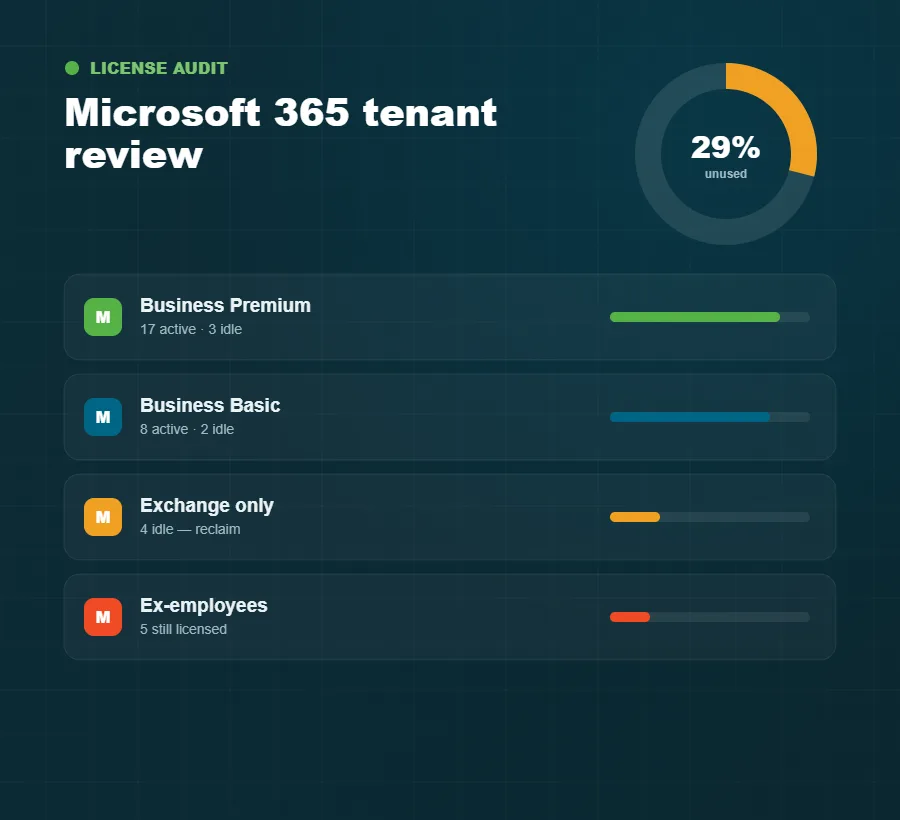
29% of SaaS licenses are unused or underutilized in the average organization, according to Productiv’s 2026 SaaS Benchmark Report. For a 20-person company on Microsoft 365 Business Premium, that’s roughly $1,500 a year in dead spend. The bigger cost is the mismatched ones — half the team on Business Premium, the other half on Basic with no clear reason, or someone who needs desktop Office stuck on a web-only plan because nobody reviewed it during onboarding three years ago.
We audit every client’s M365 tenant at onboarding: what licenses are active, who’s actually using them, what security policies are applied, what’s exposed. It takes about a week. Most of the time we find money to save and gaps to close simultaneously.
Migrations go wrong when nobody plans the details.
Moving email makes business owners nervous — rightfully. Data loss occurs in roughly 12% of self-managed migrations versus under 1% with professional services, according to 2026 cloud migration research compiled from Gartner and IDC data by Medha Cloud. That gap exists because migrations aren’t about moving files. They’re about DNS records, mail flow rules, shared mailboxes, calendar delegation, distribution lists, and forty other things nobody thinks about until they break.
We’ve migrated businesses in Westchester, Rockland, and Bergen from on-premises Exchange, Google Workspace, GoDaddy email, and hosted Exchange providers that no longer exist. Mike Stoveken, VJNetworks’ Vice President, is Azure certified with 20+ years of hands-on experience across small business and enterprise environments. When he migrates a 15-person accounting firm’s mailboxes to Exchange Online over a weekend, there’s no guesswork.
Choosing between the platforms in the first place is a separate question. We work through which platform fits your business before anyone talks about a cutover.
Our migrations are handled as soft cutovers to minimize disruption. We continuously sync data between old and new systems while DNS propagation completes, so emails and files stay available no matter where they’re delivered. Once everything routes properly to the new environment, we finalize with little to no downtime for your team.
Moving email, without the horror story.
Do we lose email access during a migration?
Properly planned migrations maintain mail flow throughout the cutover. We handle DNS and MX record changes during off-hours. Your team arrives Monday morning to a working inbox. Downtime only happens when a migration isn’t planned correctly, which is exactly what we prevent.
Can we keep our current email addresses?
Yes. Your domain stays yours. We migrate the mailboxes and update the routing. Your team keeps the same addresses, same contacts, and same calendar history. Nothing changes from their perspective except the infrastructure running behind it.
What happens to files on our local server?
Depends on what’s there and how your team uses it. Some businesses move everything to SharePoint and OneDrive. Others keep a hybrid setup with certain files on-premises and the rest in the cloud. We’ll recommend whatever fits how your office actually operates.

They work when someone sets them up properly.
Microsoft Teams has over 320 million monthly active users — a number that means nothing for a 12-person firm in White Plains that installed Teams in 2020 and hasn’t touched the settings since. Adoption without configuration creates its own problems: channels nobody uses, files scattered across personal OneDrive folders, guest access wide open, meeting recordings nobody can find a month later.
We configure Teams and SharePoint to match how your business actually operates — channels built around your departments or projects, file permissions that make sense, retention policies that satisfy compliance, and a walkthrough covering the parts your team uses every day (not a four-hour webinar).
The hybrid-work piece matters: if your staff splits time between a Bergen County office and home, the Microsoft environment needs to behave identically in both places. Same file access, same security policies, same setup. That requires configuration — we handle it.
The settings most small businesses never configure.
The default security settings in a new Microsoft 365 tenant aren’t enough for a business handling client data. MFA isn’t enforced by default on every plan. Conditional access requires manual configuration. Mailbox forwarding rules — which attackers quietly set up after a compromised login to redirect your email to themselves — need active monitoring. For accounting, healthcare, and professional services firms across Rockland, Westchester, and Bergen counties, the stakes are higher: financial records, protected health information, client confidentiality.
We configure and monitor your Microsoft 365 security as part of ongoing management — MFA enforcement, conditional access, anti-phishing policies in Exchange Online, data loss prevention rules, and alerts for suspicious login activity. If a deeper conversation about cybersecurity for your business is warranted, we handle that too — same team, same response commitment.
We also back up your Microsoft 365 data. This surprises people: Microsoft’s built-in retention isn’t a backup. If someone deletes a SharePoint site, or a mailbox gets compromised and emails are purged, Microsoft’s native recovery has time windows and limitations. We run independent backups of Exchange, SharePoint, and OneDrive so that if something goes wrong, we restore it completely.
Partner
Audit. Optimize. Migrate. Manage.
Audit
We review your tenant — licenses, users, security settings, mail flow, file storage, backup posture. About a week. You get a clear picture of what’s working, what’s wasting money, and what’s exposed.
Optimize
We right-size licenses, apply the security configs your business needs, clean up inactive accounts, and configure Teams, SharePoint, OneDrive, and Exchange for how your team actually works.
Migrate (when needed)
Moving from another platform or on-premises? We plan and execute the migration — DNS cutover, mailbox moves, file migration, user training — off-hours when possible, so your Monday morning starts clean.
Manage
Ongoing administration, monitoring, license management, and support. New hire? We provision the right license and set up their account. Someone can’t log in? We respond within 15 minutes.
Built for businesses that run on Microsoft.
The honest answers to the three common ones.
“We already have Microsoft 365 set up.”
Set up and managed are two different things. Who reviewed your security policies last quarter? Who removed the licenses for the three employees who left last year? Who monitors for suspicious login attempts? If the answer is nobody, the setup isn’t the problem — the management gap is.
“Can’t we handle this ourselves?”
You can. Plenty of businesses try. But 29% of SaaS licenses go to waste because nobody has time to audit them, and the security configuration work isn’t something most office managers or part-time IT people are trained to do properly. The question isn’t capability — it’s whether your time is better spent running your business or managing a Microsoft admin console.
“Our current IT vendor handles our Microsoft licenses.”
Reselling licenses and managing the environment are different services. Ask them when they last audited your security policies, reviewed your license assignments, or tested your backup recovery. If they can’t answer, they’re a billing pass-through — not a managed service.
About Microsoft 365 & Azure.
How fast do you respond when something breaks?
We respond within 15 minutes. Not a ticket confirmation — an actual response from someone on our team who already knows your environment. If Outlook stops working for your whole office mid-afternoon, we’re working on it before you finish describing the problem.
What does Microsoft 365 management cost?
It depends on your environment — number of users, which licenses are the right fit, whether a migration is involved, and what level of ongoing management makes sense. VJNetworks managed IT pricing starts at $995 per month. We’ll scope your Microsoft 365 needs during the initial assessment and give you a clear number before anything starts.
Do you support Mac users in a Microsoft 365 environment?
Yes. About 5% of our clients run Mac alongside Windows. Microsoft 365 works cross-platform and we configure and support it regardless of what devices your team uses.
What’s the difference between Microsoft 365 and Azure?
Microsoft 365 is the productivity and collaboration suite — email, Teams, SharePoint, OneDrive, the Office applications. Azure is Microsoft’s cloud infrastructure platform — virtual servers, cloud storage, networking, and backup services. Most small businesses start with Microsoft 365 and add Azure components as they move workloads off on-premises servers. VJNetworks manages both.
The businesses that call us usually don’t call because something catastrophic happened. They call because they’re tired of paying for a platform nobody is managing — and genuinely not sure whether their data is protected.
Every month of unmanaged Microsoft 365 is wasted spend and open risk.
Big enough to manage your IT. Small enough to care. 97% of our clients stay with us.